
Getting started with Spybox
Prepare your access, choose a tool and complete a useful first search. An ad research exercise to learn how to read results, track SBC credits and keep work you can use again.
Updated October 4, 2026
Contents
Start with a task, not every tool
Spybox brings together tools for ecommerce research, ad research, creation and AI. For your first session, start with the result you want: three ads to compare, copy to review or a visual to prepare. That result determines which tool to open and when you can stop.
In this tutorial, we will prepare a demonstration idea for a foldable book stand. This is a fictional exercise, with no store or advertising results attached. You can follow it with your own product, or simply learn to observe ads before deciding to buy anything or launch an offer.
| Your first question | Tool to consider | Result to keep |
|---|---|---|
| How is this product presented in ads? | PiPiAds for TikTok or Meta; Adsparo or AdSpy for Facebook and Instagram. | A few links and a note on what each ad shows. |
| What can we observe on TikTok Shop? | Kalodata to explore products and creators in the covered market. | A period, a country and observations, with estimates clearly identified. |
| How does a Shopify store organise its offer? | PPSPY to explore the stores and products it tracks. | A comparison of models, bundles and pages, not assumed profit. |
| How can I explain my product more clearly? | ChatGPT to rephrase facts; Canva or Submagic for presentation. | Reviewed copy or an exported file showing the correct product. |
| How do I start SEO research? | Rankerfox provides access to resources and tools; choose the appropriate tool afterwards. | A query or URL to study, with data supplied by the chosen tool. |
How is this product presented in ads?
- Tool to consider
- PiPiAds for TikTok or Meta; Adsparo or AdSpy for Facebook and Instagram.
- Result to keep
- A few links and a note on what each ad shows.
What can we observe on TikTok Shop?
- Tool to consider
- Kalodata to explore products and creators in the covered market.
- Result to keep
- A period, a country and observations, with estimates clearly identified.
How does a Shopify store organise its offer?
- Tool to consider
- PPSPY to explore the stores and products it tracks.
- Result to keep
- A comparison of models, bundles and pages, not assumed profit.
How can I explain my product more clearly?
- Tool to consider
- ChatGPT to rephrase facts; Canva or Submagic for presentation.
- Result to keep
- Reviewed copy or an exported file showing the correct product.
How do I start SEO research?
- Tool to consider
- Rankerfox provides access to resources and tools; choose the appropriate tool afterwards.
- Result to keep
- A query or URL to study, with data supplied by the chosen tool.
Already have the photos and copy you need? Start arranging them. Missing product information? Gather it before generating variations. A first session can end with a list of things to check rather than a file ready to publish.
Prepare your first access on a computer
Open the official Spybox.io website and your member area using your own account. The current public presentation describes a Spybox application for Windows or Mac. Follow your member area's download and sign-in instructions: an older video may show a different process. Do not look for an installer on a third-party site.
Before opening a tool, check that your subscription is active, that the tool you want is available and that you know where to check your balance. The public catalogue shows the tools offered; your access terms determine which features you can use. A Spybox subscription is not a separate direct subscription to every publisher.
Access is individual: the official FAQ prohibits sharing credentials. Keep personal logins, customer orders and payment information out of shared work. A fictional product and public information are sufficient for learning to write or analyse.
- Prepare a compatible computer and the instructions supplied in your member area.
- Check subscription status and whether the tool you want is available.
- Locate the SBC balance and usage history before your first search.
- Keep a notes document and the studied product's specifications beside you.
Once signed in, open only the tool chosen for your first task. If a screen differs from the demonstration or the tool is unavailable, consult current instructions and Spybox support before continuing.
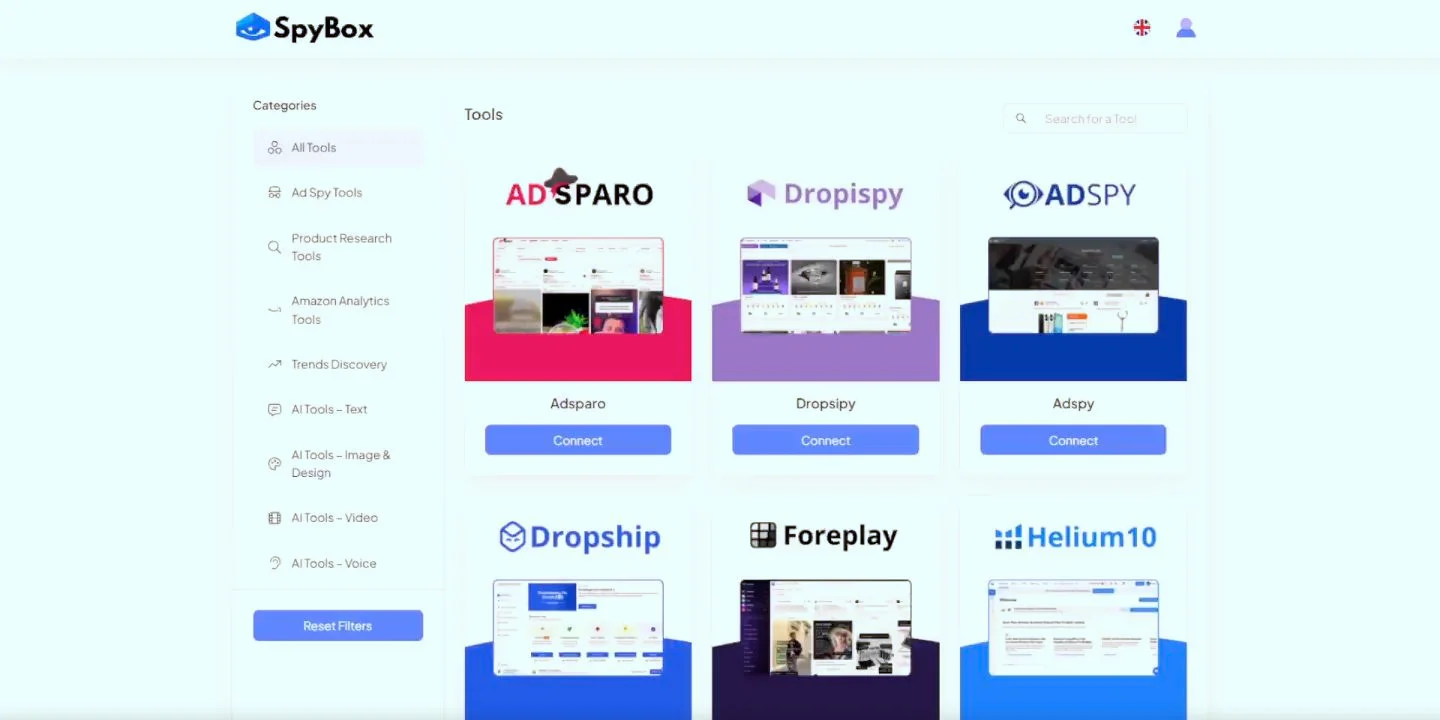
The catalogue helps you choose, not open everything
This preview comes from Spybox's public demonstration, not a personal account. It shows categories and access to several tools. Its appearance may differ from the current application: use it to understand the grouping, then choose the tool that answers your question.
Understand SBC before repeating searches
Spybox Credits, or SBC, track consumption for tools integrated into the system. They are neither euros nor the credits of a direct PiPiAds or video generator subscription. The schedule distinguishes actions: searches, detail views, generations and selected parameters. A balance alone therefore does not give a universal number of searches or videos.
The official documentation describes a standard allocation of 100,000 monthly SBC. It also states that a discount on a monthly subscription can reduce that allocation by the same percentage; annual subscriptions are exempt from this rule. Check the allocation attached to your offer, particularly with a promo code, rather than assuming the standard balance applies to every payment.
Here is a small calculation using the public schedule consulted October 4, 2026. The three PiPiAds searches and PPSPY views are separate actions; this is not the compulsory cost of our exercise. Check the cost actually displayed when you use the tool.
| Action in this example | Calculation | SBC consumption |
|---|---|---|
| 3 PiPiAds ad searches | 3 × 33 SBC | 99 SBC |
| 1 PPSPY product, ad or store search | 1 × 24 SBC | 24 SBC |
| 2 PPSPY store detail views | 2 × 2 SBC | 4 SBC |
| Total for these actions only | 99 + 24 + 4 | 127 SBC |
3 PiPiAds ad searches
- Calculation
- 3 × 33 SBC
- SBC consumption
- 99 SBC
1 PPSPY product, ad or store search
- Calculation
- 1 × 24 SBC
- SBC consumption
- 24 SBC
2 PPSPY store detail views
- Calculation
- 2 × 2 SBC
- SBC consumption
- 4 SBC
Total for these actions only
- Calculation
- 99 + 24 + 4
- SBC consumption
- 127 SBC
To get familiar with consumption, note the balance before an action, perform it once, then check usage history. You can see which tool and operation were counted. If the amount surprises you, review the detail before repeating it. More precise filters can avoid unnecessary searches; they do not automatically make each action cheaper.
Generations can vary by model, duration or resolution. Start with a limited trial before a batch. The documentation also distinguishes monthly allocation and top-ups: unused monthly credits do not roll over, while purchased top-ups have their own terms. Check your account's current balance and conditions before buying any.
First search: three ads around a book stand
Our question is specific: how can we show a book stand unfolding, holding an open book and being put away? We are looking for ways to demonstrate these three actions. We are not selecting a profitable product from a ranking or a large view count.
Choose the network to observe first. For TikTok, start with PiPiAds. For Facebook or Instagram, Adsparo or AdSpy are suitable for this research; PiPiAds also offers Meta research. Avoid mixing results from different countries and networks immediately: their context may explain some of the differences.
In your chosen tool, start with a simple term, such as 'support de livre'. If it returns few results, try an expression sellers use, such as 'reading stand', then record the country, period and format. Change one criterion at a time to understand what makes the results more relevant.
- Open an ad showing the stand unfolding or being adjusted.
- Find a second reference showing the product beside a book to understand its scale.
- Keep a third reference showing storage or transport.
- Save the link and one observation per reference; stop when the three actions are documented.
Read the copy, then watch the whole video. If the destination is publicly accessible, open the product page to check the model, quantity sold and included accessories. A stand photographed with a tablet or lamp does not mean those objects are supplied with it.
If no reference shows an important action, note the gap. It can become a question for a supplier or a shot to film with a sample. Widening the search indefinitely does not replace that check. The expected result here is a short note, not a library of hundreds of favourites.
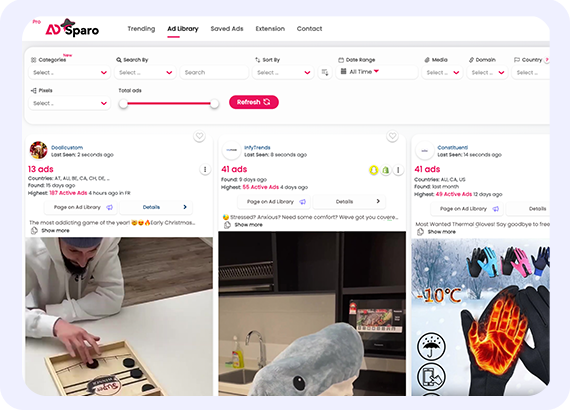
Adsparo: find ads, then read them
The public presentation shows a search and several references. For our exercise, the aim is to find a demonstration you can understand, not pick the ad with the largest figure. Visible examples are neither our campaigns nor recommendations to sell those products.
Read what the ad shows, then what still needs checking
Separate observation from conclusion. 'The video shows the folded stand in one hand' describes a scene. 'It fits every bag' adds a promise the scene does not prove. Likewise, an ad still running or attracting comments does not reveal the seller's purchases, returns and margin.
An ad detail page may show dates, interactions and estimated orders or spending. Keep their label, period and origin. Do not turn an estimate into a confirmed result, or compare a cumulative total with a one-week measure as if they were the same indicator.
Here is a fictional note for our exercise. Rows A, B and C do not identify ads we actually consulted; they show how to describe three references once found. Add your own links and dates. You can then find the scene again instead of relying on a memory of a 'good ad'.
| Reference to complete | Possible observation | Next check |
|---|---|---|
| A: unfolding, link, country and date | A hand unfolds the stand; the mechanism remains visible. | Film the same movement with the model actually sold, without hiding a step. |
| B: reading, link, country and date | An open book rests on the stand; the copy is not a measurement. | Measure dimensions and check stability and compatibility with the book used. |
| C: storage, link, country and date | The folded stand appears beside an object of known size. | Measure thickness and choose a faithful comparison, without promising every bag. |
A: unfolding, link, country and date
- Possible observation
- A hand unfolds the stand; the mechanism remains visible.
- Next check
- Film the same movement with the model actually sold, without hiding a step.
B: reading, link, country and date
- Possible observation
- An open book rests on the stand; the copy is not a measurement.
- Next check
- Measure dimensions and check stability and compatibility with the book used.
C: storage, link, country and date
- Possible observation
- The folded stand appears beside an object of known size.
- Next check
- Measure thickness and choose a faithful comparison, without promising every bag.
You can also note a question in comments: does the product hold a large book, adjust or slide on a table? That question can help prepare a demonstration. The answer should come from your product and your checks, not a statement copied from a competitor.
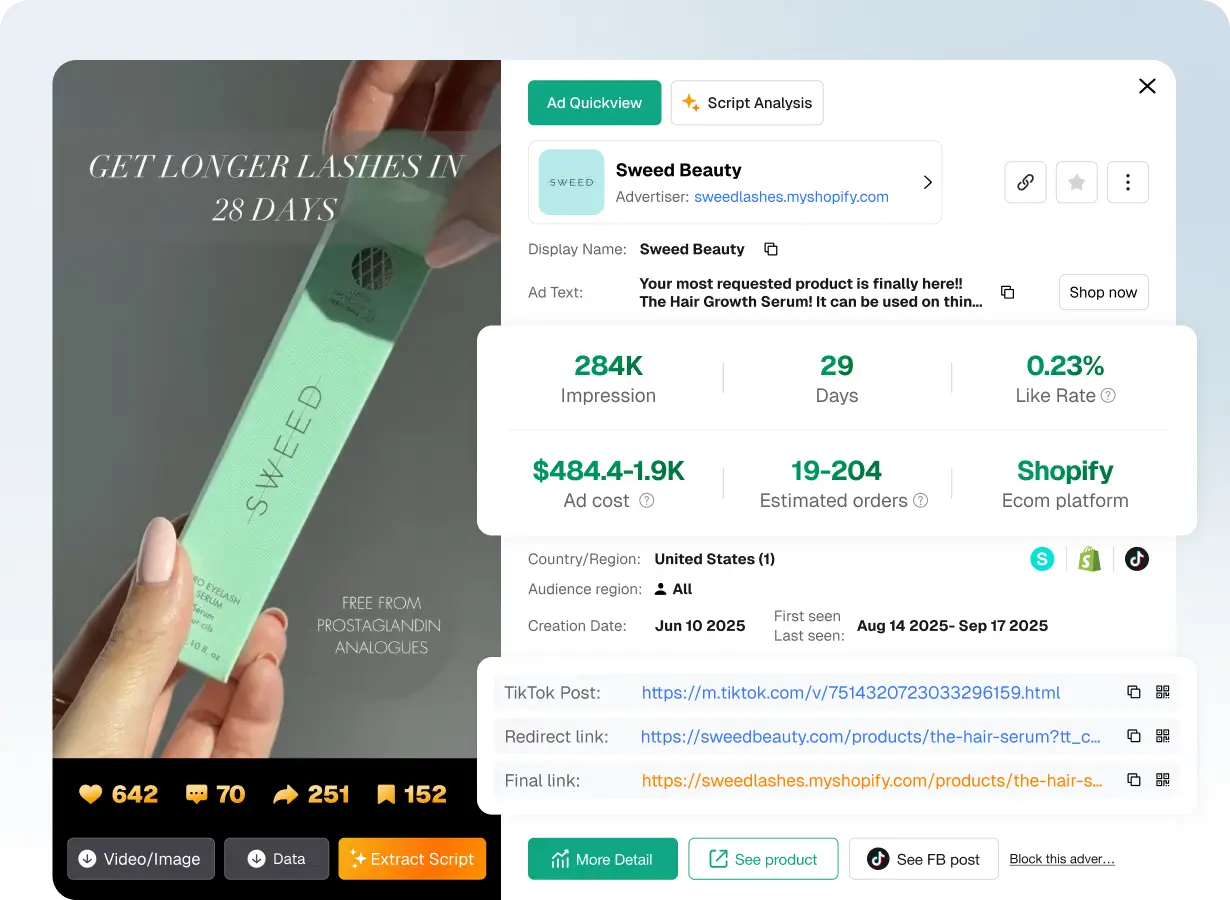
PiPiAds: an estimate remains an estimate
The publisher's example concerns another product in the United States, with dates from 2025. Estimated orders and spending should stay distinct from confirmed purchases. It illustrates fields to read; it proves neither this ad's margin nor that of our book stand.
Turn the note into your first original content
Gather facts you have: model, measured dimensions, possible movements, package contents and authorised photos. Mark other points 'to check'. For our book stand, a sample is needed before confirming stability or showing the mechanism in action.
If you use ChatGPT for copy, supply that list and a short request: 'Using only these facts, suggest two opening sentences and three shots showing the product. Flag missing information. Add neither customer reviews nor test results.' Review the sentences beside the product before keeping them.
Two possible openings for the exercise are 'Here is how this book stand unfolds' and 'The stand, once folded'. They guide the first shot without inventing a measured benefit. Adapt them to what you can actually show. If you do not yet have a sample, keep them as preparation, not a finished ad.
| Shot to prepare | What should be visible | Point to review |
|---|---|---|
| 1. The mechanism | The stand moves from folded to open, with hands and steps visible. | The sentence matches the action; no adjustment absent from the model is added. |
| 2. The book in place | The real model holds the selected book in framing that shows its size. | Dimensions and compatibility come from measurements, not a generated image. |
| 3. Storage | The stand folds and appears alone with a size reference. | Package contents and the destination page remain consistent. |
1. The mechanism
- What should be visible
- The stand moves from folded to open, with hands and steps visible.
- Point to review
- The sentence matches the action; no adjustment absent from the model is added.
2. The book in place
- What should be visible
- The real model holds the selected book in framing that shows its size.
- Point to review
- Dimensions and compatibility come from measurements, not a generated image.
3. Storage
- What should be visible
- The stand folds and appears alone with a size reference.
- Point to review
- Package contents and the destination page remain consistent.
Canva can help arrange your photos and copy; Submagic can help prepare video captions. For this first trial, choose one format and export one version. Watch the file at its intended viewing size: visible product, correct units, readable copy and no competitor photo reused without permission.
The file remains preparation. Distribution, the ad account, budget and order measurement are separate steps. First finish the exercise with content faithful to the product. You can then consult the creative or optimisation guide, depending on your need.
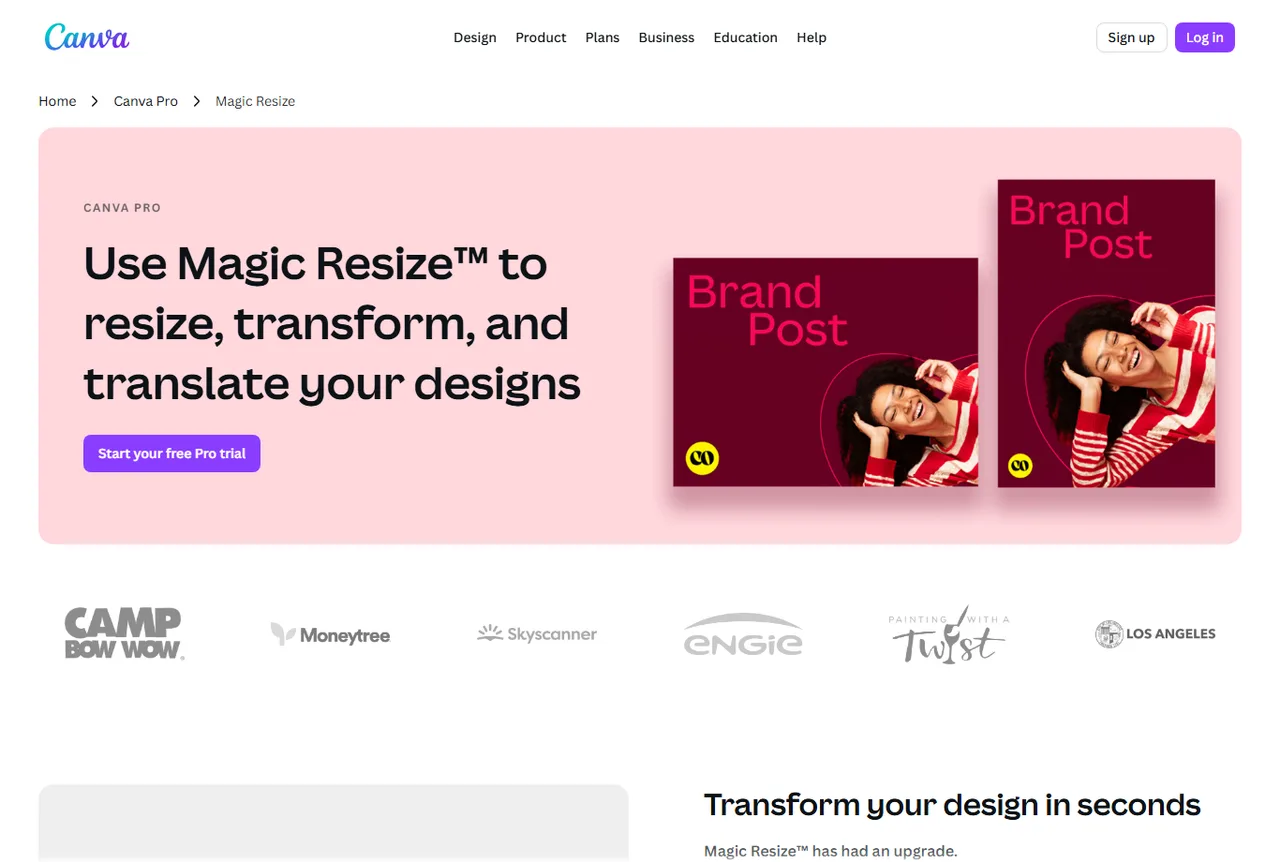
Canva: adapt the layout without changing the product
The illustration shows visual resizing. In your file, check framing, words and the space left for the product after adaptation. The presentation's options belong to Canva; their availability through your Spybox access should be checked separately.
End the session with work you can find again
Keep the note and draft in a folder you control. A favourites feature may help when available, but your first result should not depend on an assumed location inside Spybox. A document containing links, dates and observations is enough to resume work.
Give files recognisable names, such as book-stand-observations-2026-10-04 and book-stand-demonstration-A. If you change the opening, create version B rather than overwriting A. Keep the original photos and list of validated facts too: corrections will be easier.
- The initial question fits into one sentence.
- The three references have a link, a country or context and a consultation date.
- Observations and assumptions are separate.
- Product dimensions, accessories and movements are confirmed or marked for checking.
- The draft uses your information and media authorised for use.
- The exported file opens and stays readable at a small size.
- SBC history has been checked to understand the actions performed.
- One next action is selected: measurement, sample, filming or correction.
Only found two useful references? Keep them and note the missing scene. Identified that the stand is incompatible with the intended book? Stop preparing that offer. A successful first session provides an answer or a specific check; it does not require launching a campaign.
What if the first session gets stuck?
A tool does not open: first check the subscription, tool availability and current Spybox instructions. Note the tool, time, step and displayed message. Send those details to support after masking identifiers, passwords and personal information. Do not attach your entire screen by default.
A search returns nothing: check the word, country, period and filters. Try one change, then read the new results. Absence from a database does not demonstrate that a product does not exist or that nobody sells it.
Credits fall faster than expected: check history and action parameters. A search and detail view may be counted separately. Stop repeating actions until you understand the cost; a top-up does not explain unusual consumption.
Copy or a visual is inconsistent: return to the starting information. Correct the wrong specification, photo or framing before producing multiple versions. AI-assisted content needs review; it does not replace product checking.
After the first exercise, choose a useful next step
To assess a product idea, continue with market research and a sample. To sell on TikTok Shop, read the dedicated guide rather than treating the sale as a simple ad sending people to Shopify. For an existing store, the dropshipping workflow explains documents and checks to retain between research, offer preparation and orders.
The offer presented on this site brings together 90+ tools, with reference prices of €29.99/month or €249.99/year, dated August 4, 2026. Code GET25 concerns the Spybox offer, not a separate code for each publisher. Compare the final price, SBC allocation and displayed conditions before paying; credit details are explained above.
If you only need occasional research or to arrange one document, start with public resources or free versions that meet the task. An appropriate subscription comes later, according to your work frequency and the features actually needed.
Questions about getting started with Spybox
Do I need to install an application to use Spybox?
The current official presentation describes a Spybox application for Windows or Mac. Follow your member area's download and sign-in instructions. An older demonstration may show a different process; do not download an installer from a third-party website.
Which tool should I open for my first search?
Choose around the question. To observe TikTok ads, start with PiPiAds. For Facebook and Instagram, Adsparo or AdSpy are suitable. Kalodata covers areas including TikTok Shop; PPSPY helps explore Shopify. One task is enough for the first session.
Are 100,000 SBC guaranteed with every promotion?
The official documentation describes 100,000 SBC as the standard allocation. It states that a monthly discount can reduce credits proportionally, while annual subscriptions are exempt. Check the allocation and terms of your offer before paying.
Do filters make every search cheaper?
Not automatically. A relevant filter can avoid repeating searches or opening irrelevant results, but the unit cost depends on the action schedule. Check displayed consumption and usage history rather than assuming a reduction for filtering.
Does an old ad identify a profitable product?
No. Observed duration, views and interactions provide context, not confirmed purchases, returns or the seller's margin. For your own offer, check product, costs and results in your own data.
Can I follow this tutorial without a store?
Yes. You can learn to read public references and prepare a note using a fictional product. A store and advertising budget are not needed for this exercise; they become separate topics if you decide to sell.
Can I share my Spybox access with a colleague?
The official FAQ describes individual access and prohibits sharing credentials. For a team requirement, ask support about terms before working together. Do not share your credentials to make a demonstration easier.
What should I have at the end of the first session?
A clear question, a few dated references, observations separated from assumptions, reviewed copy if you have the necessary facts and one next check. The first session guarantees neither a campaign ready to run nor sales.
Sources and illustrations
Public sources consulted October 4, 2026. Access terms and the SBC schedule come from official documentation; check your account's instructions before use. Illustrations are publisher presentations, not personal account captures. The site's separate pricing reference remains August 4, 2026.