
Ad research with Spybox
Find competitors' Facebook, Instagram and TikTok ads. Choose a tool, compare messages and prepare your next creative test.
Public features and sources checked on 3 October 2026.
On this page
Which tool should you use to research competitors' ads?
Your starting point depends on what you already know: a brand, a store, a product or simply a customer problem. An official library can be enough for a one-off search. A specialist tool becomes useful when you need more filters, comparisons across advertisers or a record of changes over time.
| Your task | Starting point | Why this option |
|---|---|---|
| Find a brand's Facebook or Instagram ads | Meta Ads Library | Search the official library by advertiser or term, with a country and ad category. |
| Study TikTok formats before paying for a subscription | TikTok Creative Center | Explore the Top Ads selection by industry, objective and period. It is not the full TikTok ad inventory. |
| Compare TikTok and Meta ads in one tool | PiPiAds | Search a brand, product or URL, then examine the creative, advertiser and distribution signals. |
| Start from a Facebook page or a store address | Adsparo | Search by ad text, page name or URL, with filters and a history of collected ads. |
| Explore messages and reactions on Facebook or Instagram | AdSpy | Search text, advertisers or comments to find questions and objections, rather than just likes. |
| Keep references and pass them to a team | Foreplay | Organise a Swipe File, track competitors and develop briefs from the ads you select. |
Find a brand's Facebook or Instagram ads
- Starting point
- Meta Ads Library
- Why this option
- Search the official library by advertiser or term, with a country and ad category.
Study TikTok formats before paying for a subscription
- Starting point
- TikTok Creative Center
- Why this option
- Explore the Top Ads selection by industry, objective and period. It is not the full TikTok ad inventory.
Compare TikTok and Meta ads in one tool
- Starting point
- PiPiAds
- Why this option
- Search a brand, product or URL, then examine the creative, advertiser and distribution signals.
Start from a Facebook page or a store address
- Starting point
- Adsparo
- Why this option
- Search by ad text, page name or URL, with filters and a history of collected ads.
Explore messages and reactions on Facebook or Instagram
- Starting point
- AdSpy
- Why this option
- Search text, advertisers or comments to find questions and objections, rather than just likes.
Keep references and pass them to a team
- Starting point
- Foreplay
- Why this option
- Organise a Swipe File, track competitors and develop briefs from the ads you select.
Start with the free ad libraries
In Meta Ads Library, select a country and category, then search the page name or a term describing the offer. Searching only the product name can miss a brand selling the same use case under a different label. Open the landing page as well: bundle contents, price and delivery terms often explain part of the ad's message.
Meta lists active ads and certain historical ads depending on region and category. TikTok Top Ads shows ads authorised by advertisers, with login required for more results. Use the selection to study formats, not to conclude that a missing brand does no advertising.
Read the signals without overstating them
An ad reveals a hook, a demonstration, an offer and sometimes distribution indicators. It does not automatically reveal acquisition cost or seller margin. Separate what you can see, what the tool estimates and what your own campaign will need to measure.
| Observed signal | What it may tell you | Next check |
|---|---|---|
| An ad visible on several dates | The advertiser continues running the message; duration alone does not prove profitability. | Compare dates, variants and the offer currently on sale. |
| Several videos for the same product | The brand may be exploring different hooks or audiences. | Group variants by angle instead of treating each ad as a separate product. |
| Comments about size or delivery | The creative leaves practical questions unanswered. | Check your own offer and include evidence or an answer in the video and landing page. |
| Estimated impressions, spend or orders | An approximate figure from the tool, with its period and methodology. | Read the range and source; do not turn it into audited ROAS or profit. |
| An increase in active ad count | A change in the page's advertising activity. | Examine the new messages and products, not just the chart. |
An ad visible on several dates
- What it may tell you
- The advertiser continues running the message; duration alone does not prove profitability.
- Next check
- Compare dates, variants and the offer currently on sale.
Several videos for the same product
- What it may tell you
- The brand may be exploring different hooks or audiences.
- Next check
- Group variants by angle instead of treating each ad as a separate product.
Comments about size or delivery
- What it may tell you
- The creative leaves practical questions unanswered.
- Next check
- Check your own offer and include evidence or an answer in the video and landing page.
Estimated impressions, spend or orders
- What it may tell you
- An approximate figure from the tool, with its period and methodology.
- Next check
- Read the range and source; do not turn it into audited ROAS or profit.
An increase in active ad count
- What it may tell you
- A change in the page's advertising activity.
- Next check
- Examine the new messages and products, not just the chart.
These four previews are public demonstrations supplied by the publishers. Their counters help explain the interfaces; they do not verify the featured brands' current performance.
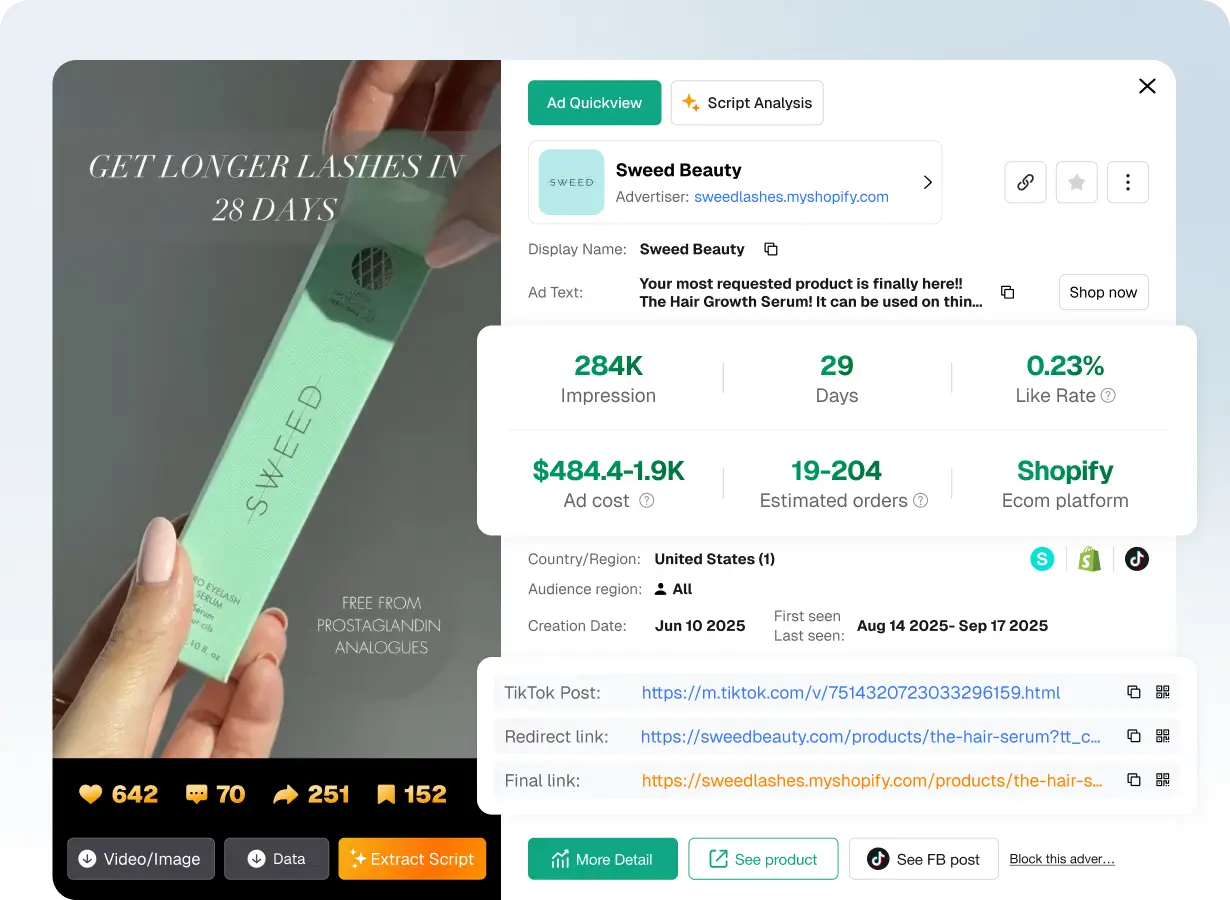
PiPiAds: read an ad in context
The preview brings together the video, advertiser, dates and indicators. Start with what the creative actually shows: the product in a hand, a usage gesture and the wording of its claim. Then compare that message with the landing page instead of ranking the ad by one counter.
The estimated order range shown here is wide. It is a reason to investigate further, not to claim that the campaign makes money. The PiPiAds guide explains this interpretation and distinguishes direct credits from Spybox access.
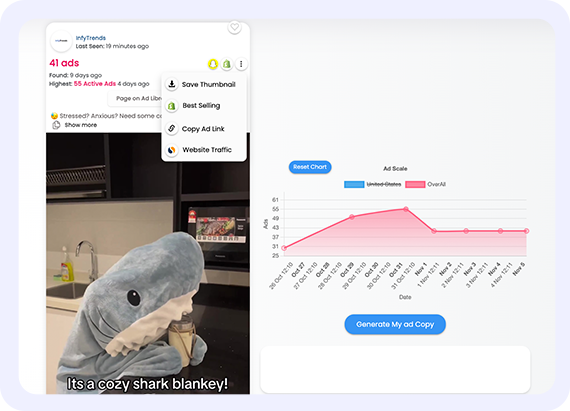
Adsparo: observe changes on a page
The Ad Scale chart shows changes in active ad count. Look for what changes behind the line: a different format, a new product, another offer or a series of variants. More ads do not reveal how many orders were placed.
When comparing two visits, record the date, page name and selected messages. A stopped ad may have been replaced; it is not automatically a failure. A tool's collected history is different from access to the merchant's ad account.
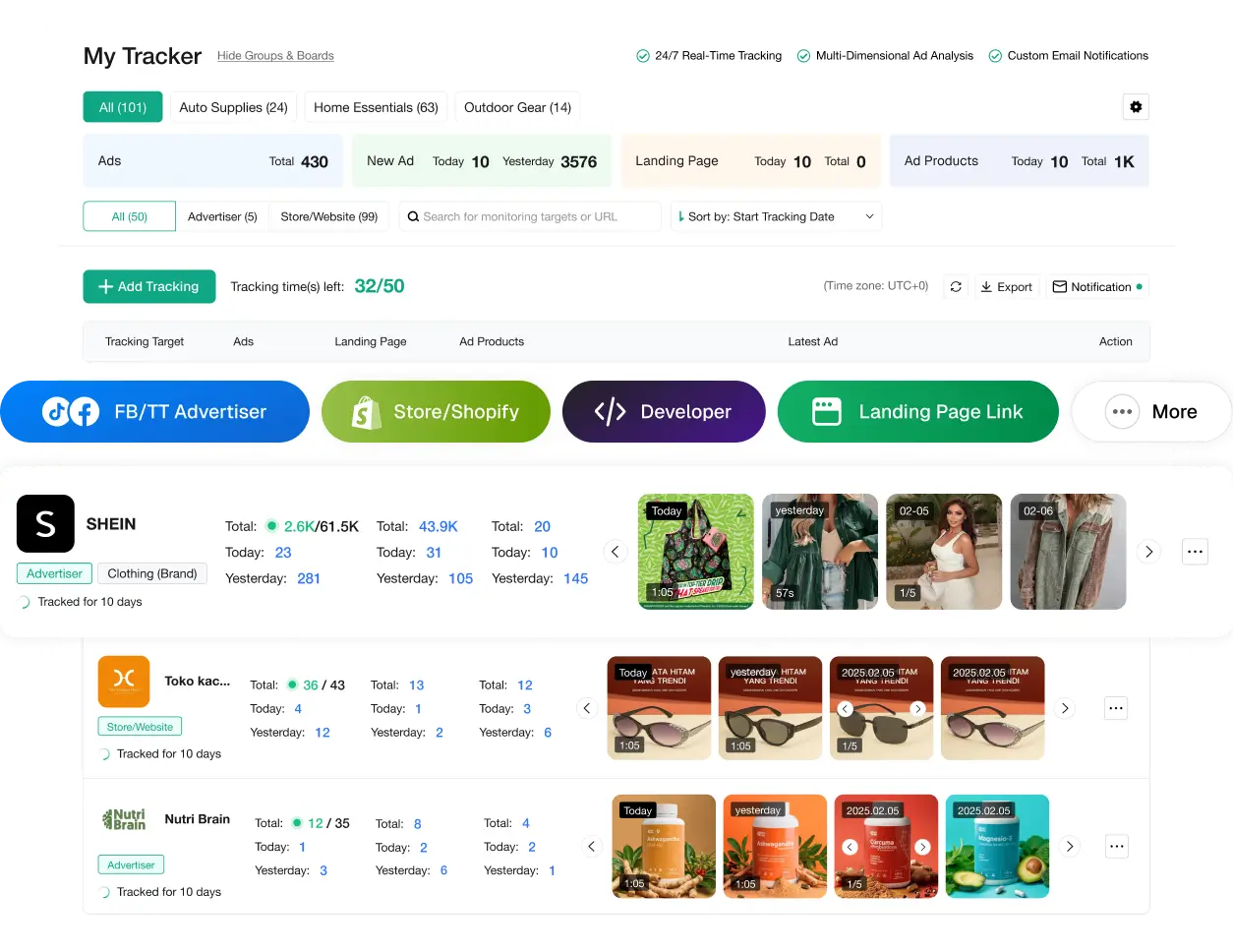
PiPiAds: compare a brand over time
Advertiser or store tracking is useful when your question concerns changes in communication. Keep a small selection of genuinely comparable competitors: the same market, similar range and a close price level. Otherwise, a large retailer can end up dictating decisions that do not fit your resources.
On your next visit, look for new hooks and changed destinations. Saving ten near-identical variants contributes less than a note explaining the change. Available tracking features and consumption depend on the offer you use.
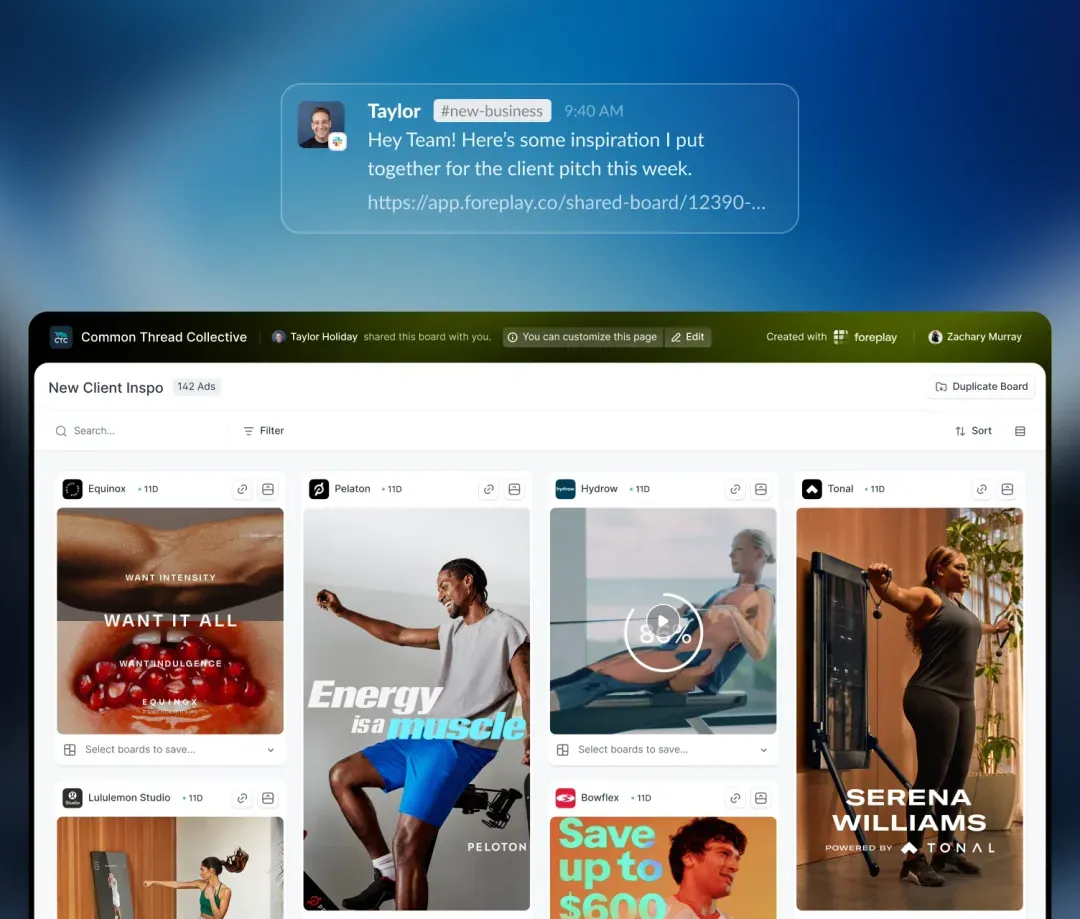
Foreplay: keep a reference you can use
An inspiration board is useful when every saved ad includes an observation. Group references by customer problem, evidence type or moment in the video. A folder called mechanism demonstrations is more actionable than a collection of supposed winning ads with no explanation.
When sharing the board, add what you want to test and what must remain specific to your brand. Foreplay connects saving, organisation and briefs; references do not replace your own footage or knowledge of the product.
Six steps from research to a creative brief
The result should not be a folder full of videos. It should be a test question and a creative your team can produce. The method works for a store, agency or freelancer preparing a new campaign.
1.Define the question and market
Ask something specific: how do competitors show assembly, address a size objection or explain a bundle? Set the country, language, product and price level. An international brand can offer production ideas, but its sales conditions are not necessarily comparable with yours.
2.Search by brand, product and problem
Start with known competitors, then expand to the customer's wording. For a reading light, also search the need to read in bed or illuminate a page. Add filters one at a time: country, period and format. Overly narrow filters can hide a useful message; missing results may simply reflect the tool's coverage.
3.Select a few different references
Choose ads that address the question through different approaches: a usage situation, demonstration, objection or comparison. Skip variants that only change a colour or subtitle. Record the URL, observation date and selection reason so you can explain the choice after watching.
4.Break down the video and offer
Watch the opening without sound, then with sound. Note the opening line, the gesture that demonstrates use and the point where the offer appears. Open the destination and check price, bundle contents, accessories, warranty and delivery. A video may be convincing because its offer differs, not because its editing is better.
5.Write a hypothesis and film your version
Use a short hypothesis, such as: showing the adjustment in the opening will make the use case clearer. Film your product in a real situation, with your own wording and authorised assets. Keep one main change between variants so the comparison does not mix hook, price, format and claim.
6.Measure and record the next change
Set the objective and decision criteria before launch. Examine results with the same period, conversion event and comparable context. Your account's performance drives decisions; competitors' counters remain references. Keep conclusions from disappointing tests as well, so you do not repeat the same idea.
Worked example: preparing an ad for a reading light
Fictional exercise: a store is preparing a rechargeable light that clips onto a book. The three references below illustrate possible angles; they are not observed campaigns or sales results. The goal is to decide what to demonstrate before filming.
| Angle to study | Question to resolve | Your original creative |
|---|---|---|
| Reading in bed | Does the beam illuminate the page without bothering the person beside you? | Film a wide shot, then a close-up of the page, with the lighting conditions stated. |
| Carrying the light | Does the clip hold on the book, and is the product easy to pack? | Show attachment, removal and storage in your own bag. |
| Adjusting the light | Is adjustment understandable, and is the difference genuinely visible? | Show the same passage with two settings without changing the rest of the scene. |
Reading in bed
- Question to resolve
- Does the beam illuminate the page without bothering the person beside you?
- Your original creative
- Film a wide shot, then a close-up of the page, with the lighting conditions stated.
Carrying the light
- Question to resolve
- Does the clip hold on the book, and is the product easy to pack?
- Your original creative
- Show attachment, removal and storage in your own bag.
Adjusting the light
- Question to resolve
- Is adjustment understandable, and is the difference genuinely visible?
- Your original creative
- Show the same passage with two settings without changing the rest of the scene.
Test the product first: attachment, settings, box contents and charging. If you have not measured battery life, do not make a duration the main claim. An honest demonstration of adjustment already offers evidence a viewer can understand.
For the first comparison, keep the same price, page and demonstration. Change only the opening: reading in bed or a close-up of the adjustment. You are testing which introduction makes the product clearer, not recreating a competitor's video or announcing an imaginary conversion rate.
The brief to share before filming
| Element | Reading-light example | Check |
|---|---|---|
| Message | An adjustable light for reading a page in bed. | The demonstrated use matches the delivered product. |
| Visual evidence | Attaching the clip and changing the setting in a continuous shot. | No hidden lighting or accessory change. |
| Offer and destination | One light, its cable and the store's delivery terms. | The ad and page show the same contents and price. |
Message
- Reading-light example
- An adjustable light for reading a page in bed.
- Check
- The demonstrated use matches the delivered product.
Visual evidence
- Reading-light example
- Attaching the clip and changing the setting in a continuous shot.
- Check
- No hidden lighting or accessory change.
Offer and destination
- Reading-light example
- One light, its cable and the store's delivery terms.
- Check
- The ad and page show the same contents and price.
- Attach a reference for its structure and add one sentence explaining what interests you.
- List the shots, on-screen text and assets you are authorised to use.
- Name variants by the difference being tested, rather than best version.
- Review subtitles, product visibility and the offer on mobile before launch.
After launch, examine your own campaign
A strong opening can attract clicks without generating orders. Connect creative analysis with the journey: product understanding, page arrival, add to cart and purchase. If clicks improve but later steps weaken, first check whether the claim, price and delivery terms match.
Reactions do not all mean the same thing. A question about charging may suggest an extra demonstration; a price objection may call for a comparison of offer contents. One isolated comment does not justify redesigning the entire campaign.
Decide from your account data and the planned test budget. Comparing ads shown in different periods or to different audiences makes interpretation weaker. Archive the creative, context and useful conclusion before producing the next variant.
Keep research short and regular
- On the first visit, select a few competitors and write the week's question.
- On the next visit, note changes in hooks, products, offers or destinations.
- Before filming, keep only the references that answer the current brief.
- After testing, add your own observations and the next change to the record.
When Spybox access becomes useful
Spybox brings together 90+ research, advertising and creative tools. The standard offer is EUR 29.99/month or EUR 249.99/year, with 100,000 monthly SBC credits. It suits work spanning several stages, rather than a single occasional search in a free library.
Choose the features you need first: finding ads, tracking a page, keeping references or producing video. Direct tool subscriptions have their own allowances and terms. Their credits are not SBC, and shared access does not automatically equal a high-tier individual subscription.
- Check the available features and consumption in your access before a lengthy research session.
- Use GET25 on Spybox only; the applicable discount must appear before you confirm payment.
- For an isolated search, starting with Meta Ads Library or TikTok Creative Center remains a sensible option.
Fill the gaps left by ad research
- PPSPY
Compare Shopify stores, products, variants and bundles behind an ad.
- Kalodata
Study TikTok Shop context when your research concerns products, videos and creators.
- ChatGPT
Organise notes and propose scripts from product facts, then review them before filming.
- Submagic
Finish short videos and subtitles after filming the footage you need.
More creative research guides
Questions about ad research
How can I see a competitor's Facebook and Instagram ads?
Open Meta Ads Library, choose a country and category, then search the page name or a term related to the offer. Compare the messages and open their destinations. Adsparo and AdSpy add search or tracking options to this first visit.
Can I view TikTok ads for free?
TikTok Creative Center offers a Top Ads selection with industry, objective and period filters. Featured ads have been authorised by their advertisers, so the selection is not exhaustive. The site requires login to access more results.
Which tool can search TikTok and Meta ads?
PiPiAds presents TikTok, Facebook and Instagram ad search by terms, products or URLs. For a specific Facebook page, Adsparo may be a more direct starting point. Choose according to your question and the features available through your access.
Is a long-running ad necessarily profitable?
No. Continued visibility indicates distribution, not the merchant's acquisition cost, returns or margin. Tools may provide estimates. Your own sales and costs determine the profitability of your campaign.
What does Adsparo's Ad Scale chart measure?
The public illustration shows changes in active ad count. It helps you look for changes in messages or formats associated with that activity. The counter is not an order total or a profit indicator.
Why use Foreplay after researching ads?
Foreplay helps save and organise ad references, track competitors and prepare briefs. It can convey the selected angle, required evidence and next variant to a team, instead of a list of unexplained links.
Should I reuse a competitor's video or wording?
Analyse the reference's customer problem, structure and demonstration style. Produce your own images, wording and evidence using authorised assets. A tool's download feature does not by itself grant permission to republish the creative.
Does Spybox replace free ad libraries?
No. The libraries remain useful for occasional research. Spybox combines 90+ tools at EUR 29.99/month or EUR 249.99/year, with SBC credits. Compare access against the features you will actually use, without treating SBC as the tools' direct allowances.