
Create a UGC-style ad with Spybox
Creator, AI presenter or hybrid edit: decide who introduces the product and what needs to be filmed. A video example, deliverables to agree and tools for each stage.
Updated October 3, 2026
Contents
UGC, creator video or avatar: who is speaking?
UGC means User Generated Content: content produced by users. In advertising, the term also describes videos commissioned from creators who present a product, handle it or discuss an experience. This conversational style can make a use easier to understand. It does not guarantee more sales: the product, offer, audience and destination page matter too.
Choose the speaker around the scene. To show a fastening or an object's size, film a real sample, with or without a face. An AI presenter may help explain an offer in several languages. A testimonial is different: it should describe an experience that actually happened. A realistic avatar does not turn a written sentence into a customer review.
| Option | When it helps | What to arrange |
|---|---|---|
| Real customer | Describe a use they know and show their own context. | Permission to distribute it, the original content and statements faithful to their experience. |
| Creator or team member | Film a demonstration, use case or talking-head presentation. | A sample, a clear commission and agreed use of their likeness and the file. |
| AI presenter | Explain confirmed features or adapt a narration. | Reviewed copy, media rights and AI disclosure appropriate to the distribution channel. |
| Hybrid edit | Combine AI narration with your real product footage. | Shots showing the mechanism and a clear transition between the presenter and the real object. |
Real customer
- When it helps
- Describe a use they know and show their own context.
- What to arrange
- Permission to distribute it, the original content and statements faithful to their experience.
Creator or team member
- When it helps
- Film a demonstration, use case or talking-head presentation.
- What to arrange
- A sample, a clear commission and agreed use of their likeness and the file.
AI presenter
- When it helps
- Explain confirmed features or adapt a narration.
- What to arrange
- Reviewed copy, media rights and AI disclosure appropriate to the distribution channel.
Hybrid edit
- When it helps
- Combine AI narration with your real product footage.
- What to arrange
- Shots showing the mechanism and a clear transition between the presenter and the real object.
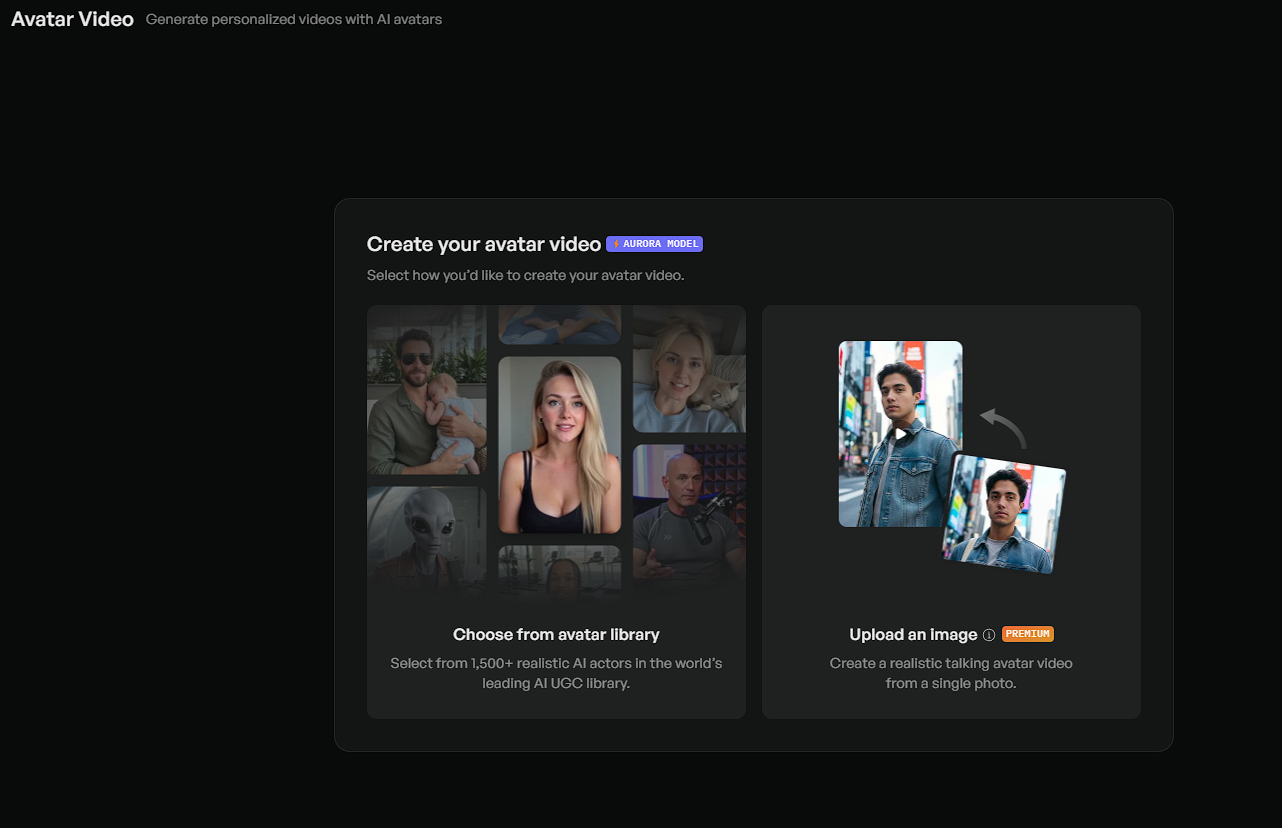
Creatify: choose a presenter, not a customer review
The illustration presents a library and an image upload option. For narration, listen to the copy and inspect expressions before preparing variants. Options and plan labels shown belong to Creatify in this example; they do not automatically describe Spybox access. A convincing face is not enough to justify a story of personal experience.
Before commissioning: decide what you want delivered
An order for 'a natural-looking video of my product' leaves too many decisions until filming. Describe the customer's question, the action that answers it and where the video will run. A few reference ads can explain framing or pace. Keep a note for each reference and use your own footage, voice and offer.
Separate the edited file from the raw takes. A video with music and captions is useful for immediate distribution; clean footage lets you change a sentence, opening or translation later. Three different openings followed by the same body require a different commission from three complete demonstrations. Agree what is included before filming.
| Item to agree | Concrete request | Why it matters |
|---|---|---|
| Product and variant | Model, colour, package contents and verified specifications. | The video should show what someone can actually buy after clicking. |
| Essential footage | An uninterrupted use, a close-up of the mechanism and a size reference. | You can edit without reconstructing an action or dimension. |
| Versions | Three openings, a common body and a common ending in this exercise. | You can identify each version and understand what changes. |
| Delivered files | Original takes, separate narration where available, exports with and without captions. | Later adaptations will rely less on the first edit. |
| Revisions | Deadline, revision rounds and the difference between a correction and a reshoot. | Changing a sentence and filming a scene again are different tasks. |
| Usage | Organic or paid distribution, channels, duration, territory and necessary permissions. | Receiving a file does not by itself explain every use agreed with its creator. |
Product and variant
- Concrete request
- Model, colour, package contents and verified specifications.
- Why it matters
- The video should show what someone can actually buy after clicking.
Essential footage
- Concrete request
- An uninterrupted use, a close-up of the mechanism and a size reference.
- Why it matters
- You can edit without reconstructing an action or dimension.
Versions
- Concrete request
- Three openings, a common body and a common ending in this exercise.
- Why it matters
- You can identify each version and understand what changes.
Delivered files
- Concrete request
- Original takes, separate narration where available, exports with and without captions.
- Why it matters
- Later adaptations will rely less on the first edit.
Revisions
- Concrete request
- Deadline, revision rounds and the difference between a correction and a reshoot.
- Why it matters
- Changing a sentence and filming a scene again are different tasks.
Usage
- Concrete request
- Organic or paid distribution, channels, duration, territory and necessary permissions.
- Why it matters
- Receiving a file does not by itself explain every use agreed with its creator.
Compare quotes using the same deliverables. Include sample shipping, potential reshoots and editing in the production cost. With an AI tool, count rejected generations and review time too. The useful cost is that of a usable, authorised version, not simply the first file produced.
Prepare a clear product sheet: photos of the right model, dimensions, use, bundle contents and offer conditions. ChatGPT can help condense these facts into spoken copy; someone who knows the product should approve the sentences. Keep unmeasured assumptions separate so they do not become claims in the video.
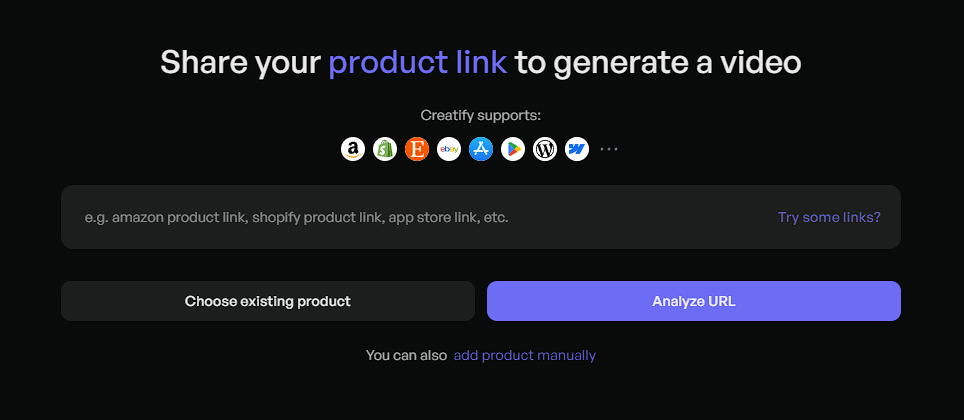
The product link is only the starting point
The link field supplies starting information. Check the model, selected images and suggested sentences afterwards. If a page mixes several variants or an old offer, prepare the correct assets separately. The manual input option described in the help page also lets you use your own information instead of an incomplete page.
Example: show a foldable bag instead of listing its qualities
Consider a fictional exercise: a shop wants to present a foldable shopping bag with a zip fastening. It has a sample. The subject is simple: show the opened bag, its fastening and how it folds. There are no advertising results or customer reviews attached to this example.
The shop first prepares an uninterrupted shot of the real bag. It measures the dimensions and photographs what is delivered. Strength, waterproofing or a maximum capacity would require specific checks, so they are not in the initial copy. The speaker can introduce the object without pretending to be a customer who has used it for months.
The three openings below emphasise different things. To compare them, keep the rest of the edit, offer and destination identical. The sentences are suggestions for this exercise, to adapt to the actions and measurements of the product actually sold.
- A. Storage: open the folded bag on camera. 'Here is how this bag unfolds.'
- B. Fastening: show the zip, then close the bag. 'A close-up of the zip fastening.'
- C. Size: place the opened bag beside a visible reference. 'See its size once opened.'
| Approximate timing | Footage to prepare | Copy for version A |
|---|---|---|
| 0 to 3 seconds | The real bag moves from folded to open without hiding the first action. | 'Here is how this bag unfolds.' |
| 3 to 8 seconds | The opened bag and handles stay visible; someone holds it at table height. | 'Once open, here are its shape and handles.' |
| 8 to 13 seconds | Close-up of the zip, followed by the complete fastening movement. | 'The zip fastening closes like this.' |
| 13 to 17 seconds | The bag is emptied and folded, with the necessary steps easy to see. | 'It folds away after use.' |
| 17 to 20 seconds | The bag alone and its model reference, without accessories suggesting a bundle. | 'See the dimensions and available colours.' |
0 to 3 seconds
- Footage to prepare
- The real bag moves from folded to open without hiding the first action.
- Copy for version A
- 'Here is how this bag unfolds.'
3 to 8 seconds
- Footage to prepare
- The opened bag and handles stay visible; someone holds it at table height.
- Copy for version A
- 'Once open, here are its shape and handles.'
8 to 13 seconds
- Footage to prepare
- Close-up of the zip, followed by the complete fastening movement.
- Copy for version A
- 'The zip fastening closes like this.'
13 to 17 seconds
- Footage to prepare
- The bag is emptied and folded, with the necessary steps easy to see.
- Copy for version A
- 'It folds away after use.'
17 to 20 seconds
- Footage to prepare
- The bag alone and its model reference, without accessories suggesting a bundle.
- Copy for version A
- 'See the dimensions and available colours.'
Twenty seconds is an approximate duration, not a target that justifies hiding a step. If folding takes longer, extend the shot or explain the cut. The final sentence leads to the same model's product page, where dimensions and colours should be easy to find.
You can film this storyboard with someone on camera, only their hands and a voice, or an avatar delivering the introductory lines. The action and bag footage stay real in all three cases. Keeping them separate lets you change the narration without changing the demonstration.
Film the shots that will be difficult to replace
Start with the demonstration before changing outfits or backgrounds. For our bag, the fold and fastening are the shots the edit depends on. Position the camera so the hands and object remain visible throughout. A stable vertical take, consistent light and clean sound often make production simpler than a succession of effects.
Film each opening separately, leaving a short margin before and after the action. You can join it to the common body without cutting the first word. Record a silent product take too, for use during narration. A face can make the scene more personal; it should not fill the frame when viewers need to see the fastening.
- Film the model actually sold and identify accessories used in the scene.
- Keep a complete take of opening, fastening and folding.
- Add a close-up, a full view and a consistent size reference.
- Listen to one take before continuing: microphone rubbing, hiss and room noise may obscure the voice.
- Leave space around the product for the chosen placement's buttons and captions.
- Review received footage before the creator puts the product away or ends the session.
On delivery, organise takes by action: opening A, fastening B, size view C, common body and ending. Record the model and date with the files. A good uninterrupted take is useful even when too long for the final ad; a close crop that hides part of the action is much less useful.
Make an avatar version without inventing personal experience
Creatify can prepare a video from a script and avatar; its URL-to-video tool accepts a product page or manually supplied assets. Hoox also describes production combining text, voice and media. These features can help prepare narration or variations using information and footage you have checked.
For the bag, the avatar can say 'here is how it folds', then give way to your uninterrupted shot. 'I have carried it every day for six months' would describe an invented experience. Keep the role clear: a presenter describes the object; a real user discusses their experience. Either can sound warm and conversational.
Check appearance and pronunciation on a short extract before generating several versions. Then inspect product details frame by frame: handles, fastening, logos and proportions. Replace a generated shot in which the bag changes shape with footage of the sample. Translating narration also means reviewing specifications and sales conditions for the intended audience.
TikTok's advertising rules require disclosure for entirely AI-generated or significantly AI-modified media, while distinguishing minor adjustments. For a realistic presenter, prepare that disclosure and check the appropriate distribution setting. Also review the chosen channel's rules, permission from the person depicted and the conditions for the voices, avatars and music used.
An AI label does not authorise misleading claims or an image used without consent. If you use your own likeness or a creator's, agree separately to the creation and uses of a digital double. Delivery of a real video does not automatically give consent to reuse that voice or face in other scripts.
Edit a video that makes sense with and without sound
Make a first edit using footage and voice alone. Notice where a sentence arrives too early or late: the fastening should appear when it is described. Add captions, music and transitions afterwards. This order helps reveal missing information before an animation covers it.
Creatify offers an editor; Submagic helps with tasks including captions and cutaway footage. A cutaway, or B-roll, supports the narration. For the bag, choose a shot of the real product rather than a generic shopping scene that barely resembles it. Correct transcription errors, units and names, and check that words do not hide the hands.
TikTok recommends vertical 9:16, sound and the interface's safe zones for its ads. Choose the placement before export and inspect the preview in the ad platform. Square or vertical cropping may require moving a caption or selecting another shot. These recommendations help prepare the file; they do not predict your campaign's result.
Export each version with a distinct name, such as bag-A-storage, bag-B-fastening and bag-C-size. Keep an export without music or burned-in text where the edit allows it. Watch the final files on a small screen, then open their destination: product, variant, price, availability and delivery should match the ad.
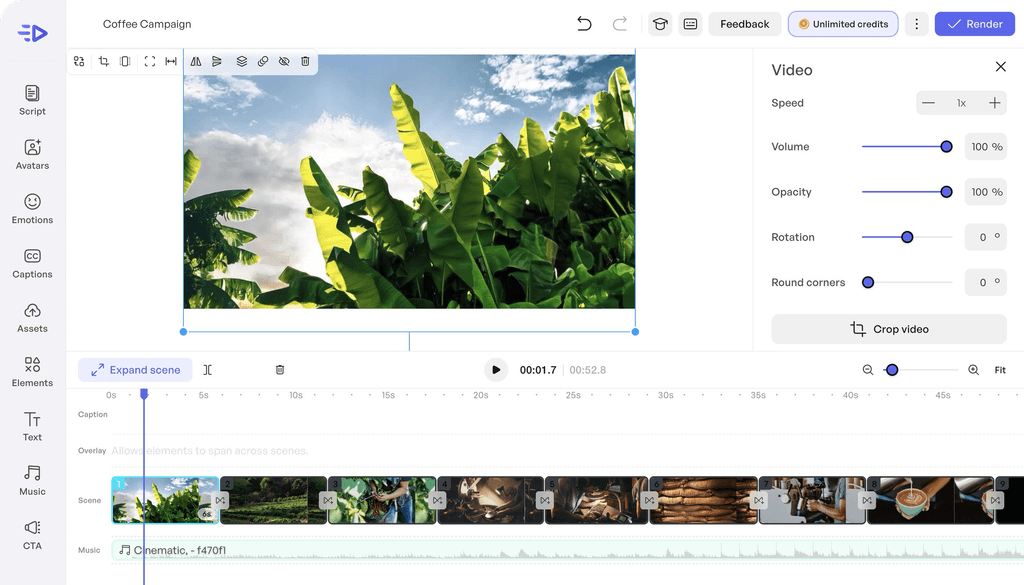
The timeline shows what appears during the sentence
The public example shows vegetation and coffee shots on a timeline, with a music track. In your own video, compare the visible shot with the spoken sentence. The credit label belongs to this publisher demonstration, not a promise of unlimited Spybox generations. Your product footage should retain its place after editing.
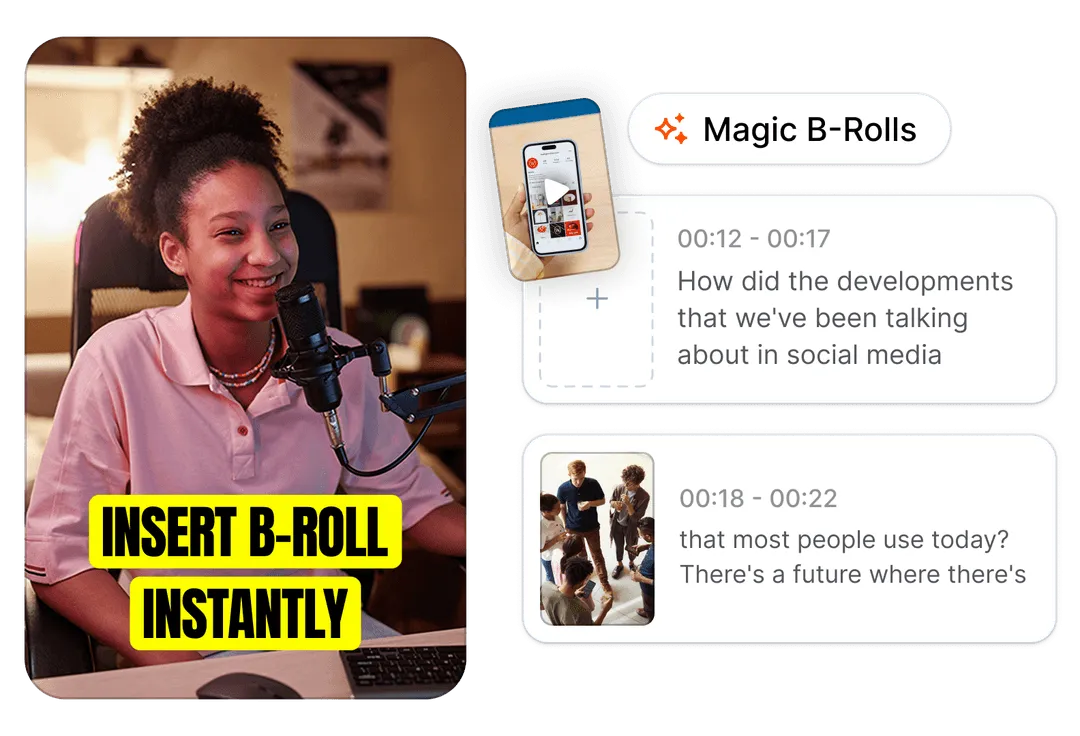
Submagic: choose a cutaway that explains something
The image illustrates footage added to narration. In the bag video, a close-up of the fastening would help when it is described; a generic scene would not add the same information. Check shot duration and text placement too. Captions should help people read the line, not cover the detail you want them to see.
Compare the openings, then decide what to change
Start with a measurable question: does the fastening opening help explain the object better than the folding opening? For a controlled comparison, keep the video body, offer and destination unchanged. A test that separates groups is preferable when the ad platform supports it. In ordinary delivery, different budget or audience allocations limit the comparison.
Record each version's period, spend, impressions, destination clicks and attributed orders using the same window. Click-through rate also depends on which click definition you use. Retention describes viewing; margin after advertising describes the offer's economics. An entertaining opening can attract people with no reason to buy the bag.
| What you observe | What it suggests checking | Possible next step |
|---|---|---|
| Few viewers stay at the start | First image, product clarity, audience and distribution context. | Film an opening that shows the action or object more clearly. |
| Views hold but clicks stay low | Reason to click and connection between the demonstration and offer. | Clarify the contents or question answered on the product page. |
| Clicks arrive but few orders follow | Loading, dimensions, price, delivery, availability and purchase tracking. | Review the page and journey before making more videos. |
| Orders arrive | Acquisition cost, margin, returns and quantity of data available. | Confirm costs and prepare another useful demonstration without generalising from a few sales. |
Few viewers stay at the start
- What it suggests checking
- First image, product clarity, audience and distribution context.
- Possible next step
- Film an opening that shows the action or object more clearly.
Views hold but clicks stay low
- What it suggests checking
- Reason to click and connection between the demonstration and offer.
- Possible next step
- Clarify the contents or question answered on the product page.
Clicks arrive but few orders follow
- What it suggests checking
- Loading, dimensions, price, delivery, availability and purchase tracking.
- Possible next step
- Review the page and journey before making more videos.
Orders arrive
- What it suggests checking
- Acquisition cost, margin, returns and quantity of data available.
- Possible next step
- Confirm costs and prepare another useful demonstration without generalising from a few sales.
Set the budget and stopping rule before distribution; one sale or one day is not enough to declare a winner. If data remain too sparse or unbalanced, simply record the comparison as inconclusive. Conversion multipliers advertised elsewhere do not replace measurement on your offer.
Spybox provides access to research and creation tools. Filming, creator agreements, the store, ad account and media budget remain separate. Read campaign results in your own data; a competitor ad library supplies references, not your sales report.
Which Spybox tools should you use for this video?
Choose a tool for the task that is holding you up. If you already have footage and copy, start editing. If the product is still hard to understand, prepare the demonstration first. Opening several generators at once may simply produce versions whose differences nobody can explain.
The offer presented on this site includes 90+ tools and 100 000 monthly SBC credits, at €29.99/month or €249.99/year. The pricing reference remains August 4, 2026. Check terms, available tools and the final price before paying; Spybox access should not be confused with each publisher's direct subscription.
| Need | Tools to consider | Work still required |
|---|---|---|
| Find references | PiPiAds, Adsparo, Foreplay or GetHookd. | Describe the useful idea and find your own shots; public signals do not prove profitability. |
| Write the sentences | ChatGPT or GetHookd's script features. | Validate specifications and match each line to the action actually filmed. |
| Prepare a presenter | Creatify, Hoox or HeyGen. | Check voice, output, permissions and AI disclosure; retain real product details. |
| Finish the video | Submagic, Canva or the chosen generator's editor. | Review captions, placement, music and the exported file. |
| Measure distribution | Your ad platform and store data. | Compare versions, tracking, costs and orders; this does not happen entirely inside Spybox. |
Find references
- Tools to consider
- PiPiAds, Adsparo, Foreplay or GetHookd.
- Work still required
- Describe the useful idea and find your own shots; public signals do not prove profitability.
Write the sentences
- Tools to consider
- ChatGPT or GetHookd's script features.
- Work still required
- Validate specifications and match each line to the action actually filmed.
Prepare a presenter
- Tools to consider
- Creatify, Hoox or HeyGen.
- Work still required
- Check voice, output, permissions and AI disclosure; retain real product details.
Finish the video
- Tools to consider
- Submagic, Canva or the chosen generator's editor.
- Work still required
- Review captions, placement, music and the exported file.
Measure distribution
- Tools to consider
- Your ad platform and store data.
- Work still required
- Compare versions, tracking, costs and orders; this does not happen entirely inside Spybox.
Spybox SBC and Creatify's or Hoox's own credits are separate counters. Check the chosen feature's consumption before generating many versions; no fixed video count is inferred here from the monthly total. Code GET25 concerns the Spybox offer under the displayed terms, not a direct discount code for every publisher.
Questions about UGC-style ads
Does a UGC ad have to be filmed by a real customer?
A customer testimonial should come from a real experience. A commissioned creator video can simply present or demonstrate the product without inventing a customer history. An avatar can also act as a presenter; disclose the nature of the content according to distribution rules.
Can I make a UGC-style video without showing my face?
Yes. Film your hands, the mechanism and the product in context, then add narration or captions. For an object whose use matters more than the speaker, this demonstration can be a good starting point.
When should I choose an avatar rather than a creator?
An avatar can help explain an offer or prepare narration in several languages. A creator with a sample is more suitable when the video should show an action, genuine feeling or specific use. A hybrid edit retains real product footage with AI narration.
Which files should I request from a UGC creator?
Specify the raw footage, final edit, openings, formats, captions and separate tracks you need. Agree revisions and permitted uses too, particularly paid distribution. The number of videos alone does not describe the deliverables.
Do I need to disclose a video with an AI avatar?
Check the distribution channel's rules. TikTok's advertising rules require disclosure for entirely AI-generated or significantly AI-modified media and distinguish minor adjustments. A label does not replace permissions for likeness, voice or music.
Is a product link enough to get an ad ready to run?
Creatify can use a URL or manually supplied information to prepare a video. Review the copy, model shown, footage, captions and offer afterwards. Generating a file does not check every specification or distribution permission for you.
Does UGC always convert better than an image?
No. Results depend on the product, offer, audience, placement and destination page. Compare versions with a clear question, consistent measurement window and enough data; views and clicks alone do not prove profitability.
How many videos can I make with Spybox SBC?
The number depends on the feature, consumption and access terms. Spybox SBC are not each publisher's direct credits. Check the displayed consumption before generating; the monthly total does not establish a guaranteed video count here.
Does Spybox cover filming and the advertising budget?
Spybox provides access to research and creation tools. The sample, creator, permissions, store, ad account and distribution budget must be arranged separately. Sales measurement relies on your own data.
Sources and illustrations
Public sources consulted October 3, 2026. Illustrations describe publisher features; they are neither our campaigns nor proof of performance. Features and conditions may change. The separate Spybox pricing reference remains August 4, 2026.