
Facebook · Instagram
Adsparo with Spybox
Find a brand's ads, compare its messages and keep references worth testing. Adsparo adds filtering, saving and a history of collected ads to Meta ad research.

Meta Ad Library
Adsparo
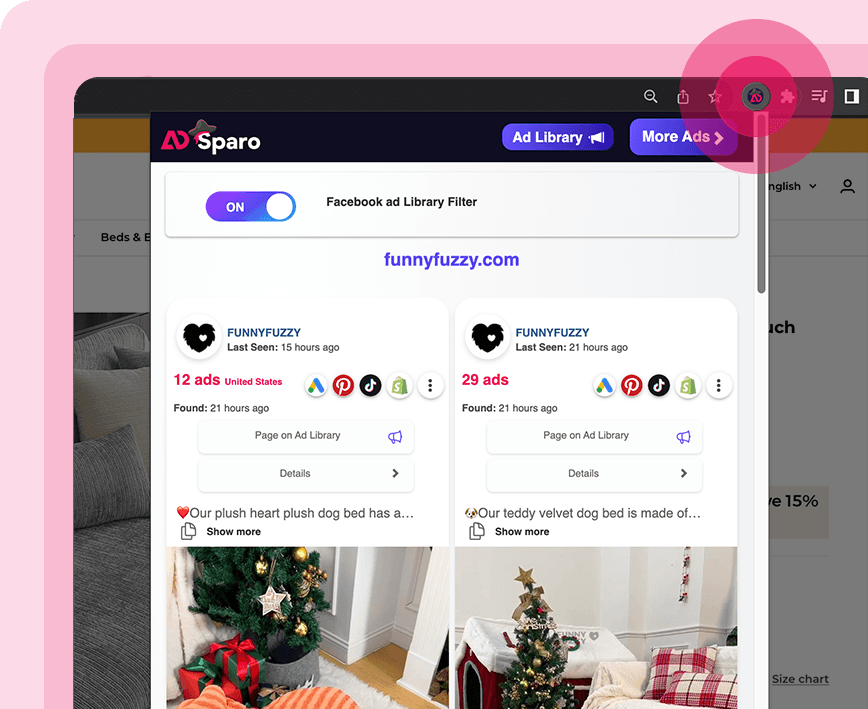
Adsparo's extension illustration finds ads associated with a store being visited. This is the publisher's presentation, not a Spybox account.
- Main focus
- Meta Ads
- Research centred on Facebook and Instagram ads and the pages running them.
- Three starting points
- Copy · page · URL
- Search for a message, a known advertiser or an address instead of browsing an entire niche.
- Monthly Spybox subscription
- €29.99
- 90+ tools and 100,000 monthly SBC credits in the Spybox offer.
You know a competing store but not its Facebook page name. Or you keep seeing the same product demonstration without knowing which brands run it. Adsparo lets you start with a URL, page name or ad copy to narrow that search. The point is to recover the context behind a message, not just find an attractive video.
The tool suits ecommerce owners, media buyers and creatives who want to understand a competing offer before preparing their own ad. For a launch, look for recurring objections and demonstrations. For an established brand, follow a small set of advertisers and changes in their messages.
Adsparo pricing: direct account, extension or Spybox?
Adsparo.com shows USD 69 per month on its home page. Its pricing page displays USD 69.99 with a USD 69/month button, so use the amount confirmed before payment rather than deducing a price from these displays. No purchase or paid trial was made for this guide.
Direct Adsparo subscriptionUSD 69/month on the home page; USD 69.99 on the pricing page
- What to compare
- If Adsparo is your main tool, check the total, included features, renewal and direct-account limits.
Adsparo Chrome extensionPresented as free on the Chrome Web Store
- What to compare
- The listing describes filters, collection and a history of collected ads. It does not establish that the entire web subscription is free.
Monthly Spybox€29.99/month
- What to compare
- 90+ tools and 100,000 monthly SBC credits. Compare the catalogue and Adsparo access conditions in Spybox, not just the advertised prices.
Annual Spybox€249.99/year
- What to compare
- Annual subscription to the Spybox bundle. This is not an annual Adsparo plan or a promise of identical access to the publisher's account.
| Option | Advertised price or access | What to compare |
|---|---|---|
| Direct Adsparo subscription | USD 69/month on the home page; USD 69.99 on the pricing page | If Adsparo is your main tool, check the total, included features, renewal and direct-account limits. |
| Adsparo Chrome extension | Presented as free on the Chrome Web Store | The listing describes filters, collection and a history of collected ads. It does not establish that the entire web subscription is free. |
| Monthly Spybox | €29.99/month | 90+ tools and 100,000 monthly SBC credits. Compare the catalogue and Adsparo access conditions in Spybox, not just the advertised prices. |
| Annual Spybox | €249.99/year | Annual subscription to the Spybox bundle. This is not an annual Adsparo plan or a promise of identical access to the publisher's account. |
Cheaper Adsparo, free access and promo codes: the differences
Choose according to the task. Occasionally finding a brand's public ads may not require the same subscription as daily research with a team.
- Start with the Meta Ad Library if you only need to view a page's public ads. Extra filters and saved references become useful when the research repeats or involves several competitors.
- A free extension and a web subscription are separate forms of access. Before installing Adsparo, read its permissions and privacy policy. Its Chrome listing declares handling website content and personally identifiable information. We have not audited its internal operation.
- GET25 applies to Spybox, not to an official Adsparo coupon. Check its discount and scope at Spybox checkout; this page does not promise a discount from Adsparo.
- A group buy is shared access supplied by a third party. Check limits, support, privacy and continuity. Spybox SBC credits do not replace Adsparo quotas; we do not have an Adsparo per-action credit schedule to publish.
- Adsparo appears in the Spybox catalogue. Check current availability, extension access and included features before buying. Inclusion does not guarantee every export, history feature or function of a direct account.
What Adsparo adds to ad research
Adsparo.com presents research around ads, pages and their history. Here is how to use those functions without attributing financial information they do not provide.
Find a brand by its address
URL search helps when a store name differs from the advertiser's page name. Compare the destination domain, page and product next: similar copy alone does not establish that two ads belong to the same brand.
Follow collected ads
Saved references let you return to an ad. The extension listing describes a history of collected ads, not necessarily an exhaustive archive of every campaign since its creation. Starting a collection today does not recover missing historical data.
Observe message changes
Sort by creation date, last observation or ad count using the options described by the publisher. Compare openings, offers and formats. A new variation may be a test; it is not a certified winning ad.
Go from a store to its ads
The extension is presented as a way to find ads while visiting a competing website. The FunnyFuzzy illustration shows that transition. Installation and use remain separate from the access conditions to check in Spybox.
Which filters fit your research question?
How does this brand sell its product?
- Filter or search
- Page name or URL
- Useful check
- Check the destination domain and associated page, then compare offers rather than visuals alone.
Which messages appear in French?
- Filter or search
- Language, country and ad copy
- Useful check
- Language and country are separate criteria. French copy does not establish that a product is sold in France.
Are there new creatives?
- Filter or search
- Creation date and last observation
- Useful check
- Separate a new ad from an old ad the tool has only recently collected.
Does this niche mainly use video?
- Filter or search
- Media type and category
- Useful check
- Also compare images and carousels; frequency alone does not establish a format's effectiveness.
Which sites use a particular technology?
- Filter or search
- Pixels, platform or domain extension
- Useful check
- A detected pixel indicates technology. A .fr domain does not prove a French company or local delivery.
| Your question | Filter or search | Useful check |
|---|---|---|
| How does this brand sell its product? | Page name or URL | Check the destination domain and associated page, then compare offers rather than visuals alone. |
| Which messages appear in French? | Language, country and ad copy | Language and country are separate criteria. French copy does not establish that a product is sold in France. |
| Are there new creatives? | Creation date and last observation | Separate a new ad from an old ad the tool has only recently collected. |
| Does this niche mainly use video? | Media type and category | Also compare images and carousels; frequency alone does not establish a format's effectiveness. |
| Which sites use a particular technology? | Pixels, platform or domain extension | A detected pixel indicates technology. A .fr domain does not prove a French company or local delivery. |
Adsparo research in pictures
These previews come from Adsparo.com's public presentation. They illustrate the publisher's advertised features, not a private account or a guarantee of the same interface in Spybox.
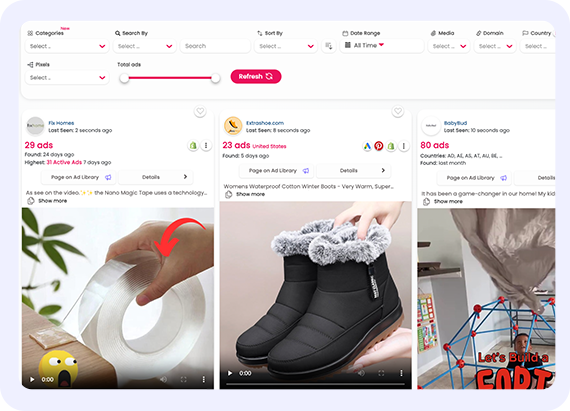
Narrow the scope
Filters sit above the results. Start with a simple scope: applying every criterion may hide a brand you wanted to observe.
Source: Adsparo.com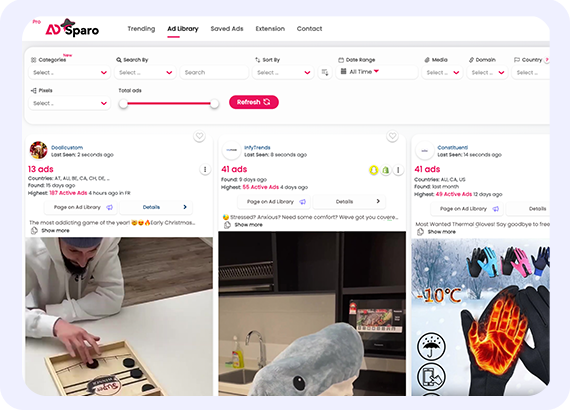
Compare ads and their pages
Each result connects a creative, a page and a route to the ad library. Open the context before keeping an idea or linking two brands.
Source: Adsparo.com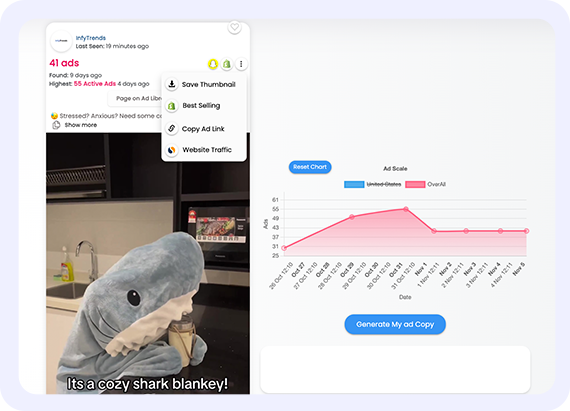
Read history without inventing sales
The shark blanket example combines a counter with an Ad Scale chart. The next section explains what it can suggest and what is missing before discussing profitability.
Source: Adsparo.com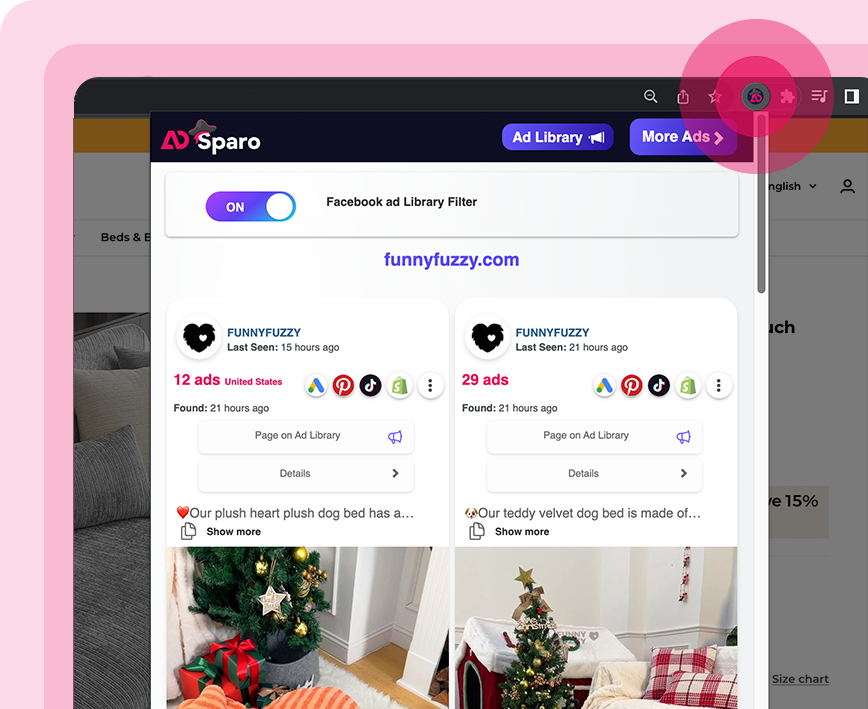
Find a store's ads
The extension panel shows FunnyFuzzy references with page and detail links. It illustrates the website-to-ad transition, not the store's current campaigns.
Source: Adsparo.comExample: what does the shark blanket chart actually say?
In the official illustration above, the InlyTrends reference shows 41 ads and a peak of 55 active ads. The Ad Scale chart rises, falls and then levels out. This is a presentation example, not a current measurement of the product.
What the illustration shows
An ad count and its variation over time. That supports a research question: did the advertiser increase variations before reducing them? Answering it would require comparing the associated creatives and dates, not just the curve's shape.
What it does not show
Orders, advertising spend and product costs are absent. Moving from 55 to 41 ads could mean retiring variations, rotating creatives or reorganising campaigns. The illustration does not distinguish between those explanations.
A creative direction worth investigating
The product is easy to demonstrate while worn and appeals to comfort. Study how the ad handles demonstration and dimensions. Do not reuse the stress or anxiety claim visible in the example without appropriate evidence.
The useful outcome is an idea to verify: demonstrate your own product's use and dimensions, then measure your audience's response. It is not a conclusion about InlyTrends' sales.
A method for turning research into a test
Consider a fictional scenario: you sell a desk organiser and want to prepare a French-language ad. No campaign results are attributed to this scenario; it illustrates the decisions required at each step.
- 1
Write the question before searching
Ask something specific: do ads emphasise space savings, quick access to accessories or the visual transformation of the desk? Set the product, market, price and format you can produce. Keep the question in view to avoid drifting into a collection of unrelated products.
- 2
Use several ways to describe the need
Try the product name, a phrase describing the problem and known competitor pages. If you know the store but not its page, start with the URL. Record the date and criteria. No results may reflect vocabulary or coverage gaps rather than an absence of competition.
- 3
Separate the angle, execution and offer
For each retained reference, describe the objection, opening seconds, demonstration and offer. Before-and-after is a format; saving space is a benefit; a discount is an offer. Separating them lets you choose one element to test without remaking a competitor's whole ad.
- 4
Check the destination page
Review dimensions, price, delivery and included accessories. A convincing desk organiser ad might conceal a product too small for your customers. Check whether the page supports the proof shown in the ad. A strong demonstration cannot solve incompatibility with your own product.
- 5
Keep fewer references with better notes
For example, retain three distinct references: the organisation demonstration, accessory access and a dimensions comparison. Add a sentence explaining each one's value. Keep the link and date to recover its context. The number of saved references is not a measure of research quality.
- 6
Test an identifiable difference
Film your product on a real desk, then create two openings: a cluttered desk or someone looking for an accessory. Keep the offer and remaining video as similar as possible. Set the criterion before launch, then read clicks, cart additions and purchases in your own analytics. Adsparo does not measure that test for you.
Adsparo, PiPiAds or Meta Ad Library?
These options address different questions. Adsparo is worth examining for finding and following ads around pages and websites. PiPiAds extends research towards TikTok, while Meta is a starting point for directly checking a public page.
View a known page's current ads
- Option to examine
- Meta Ad Library
- Why
- Start with the public source before paying for additional functions.
Start with a website or copy, then save references
- Option to examine
- Adsparo
- Why
- Search and collection around ads and their pages; check the features of your access.
Explore TikTok Ads and TikTok Shop signals
- Option to examine
- PiPiAds or Kalodata, depending on the question
- Why
- PiPiAds for ads; Kalodata for TikTok Shop analysis. Do not attribute those datasets to Adsparo.
Organise research with a creative team
- Option to examine
- Foreplay
- Why
- Compare reference organisation, annotation and sharing under the available offer.
Study a Shopify store and its products
- Option to examine
- PPSPY
- Why
- Complement ad research with store analysis; estimates do not establish real margin.
| Your priority | Option to examine | Why |
|---|---|---|
| View a known page's current ads | Meta Ad Library | Start with the public source before paying for additional functions. |
| Start with a website or copy, then save references | Adsparo | Search and collection around ads and their pages; check the features of your access. |
| Explore TikTok Ads and TikTok Shop signals | PiPiAds or Kalodata, depending on the question | PiPiAds for ads; Kalodata for TikTok Shop analysis. Do not attribute those datasets to Adsparo. |
| Organise research with a creative team | Foreplay | Compare reference organisation, annotation and sharing under the available offer. |
| Study a Shopify store and its products | PPSPY | Complement ad research with store analysis; estimates do not establish real margin. |
After Adsparo: fill the gap in your research
Compare TikTok and Facebook ad research, direct prices and the trial when you need more than Meta pages.
Organise the references you kept and share them with the people producing the creatives.
Study a Shopify store's products and structure before deciding that an ad is worth a test.
Turn observations into a brief and original openings without inventing testimonials or benefits.
Limitations that affect your decision
- Coverage: a missing ad does not establish inactivity. Cross-check Meta Ad Library and the brand's pages.
- History: collected ads may not represent an advertiser's entire history. Record when your observation starts.
- Profitability: quantity, duration and repetition do not reveal sales or spend. A chart labelled scaling does not turn ad counts into revenue.
- Features: downloads, copy generation and image editing advertised by Adsparo are not automatically included in every access. Video editing labelled coming soon is not a confirmed available feature.
- Creatives: saving an ad for analysis does not grant rights to reuse its video, music, testimonial or product photography.
- Reviews: website testimonials and extension ratings come from different sources. This guide does not merge them into a trust score or results guarantee.
Common questions about Adsparo
Does Adsparo cover Facebook and Instagram?
Yes, the public sources reviewed describe research and collection around Meta Ad Library. Do not interpret platform icons in an illustration as a guarantee of exhaustive coverage of every network.
How much does direct Adsparo access cost?
On October 2, 2026, Adsparo.com displays USD 69/month on its home page and USD 69.99 on its pricing page, alongside a USD 69/month button. Check the total and conditions before paying. We have not confirmed an annual price or bought a direct subscription.
Is Adsparo free?
The Chrome Web Store listing presents the extension as free. This does not establish free access to all web-platform features. Meta Ad Library is another option for directly viewing a page's public ads.
Is GET25 an Adsparo promo code?
No. GET25 is the code presented for Spybox. Check its discount at Spybox checkout; it is not an official coupon redeemable with Adsparo.
Is Adsparo included in Spybox?
Adsparo appears in the Spybox catalogue. The monthly bundle is presented at €29.99/month with 90+ tools and 100,000 SBC credits. Check current availability and Adsparo features; an identical direct account and extension are not guaranteed.
How do Adsparo and PiPiAds differ?
Adsparo emphasises ads, pages, filters and collection around Meta. PiPiAds is worth examining to extend ad research towards TikTok. Compare your channel, history requirements and chosen access limits rather than looking for a universal winner.
Does the Ad Scale chart show sales?
No. In the public example discussed here, it accompanies observed ad counts. It does not provide orders, revenue, margin or the advertiser's ROAS.
Is Adsparo's extension officially connected to Meta?
The Chrome listing describes an independent extension unrelated to the official Facebook application or website. Read its permissions and privacy policy before installing it.
Compare Adsparo access in the Spybox bundle
If your work combines ad research, store analysis and creative production, compare Spybox with Adsparo alone: €29.99/month or €249.99/year. Check the catalogue and limits before choosing.