

PPSPY in Spybox
Compare Shopify stores, their products and estimated sales. Pricing, trial and a worked example to help prepare your next test with PPSPY.
PPSPY pricing and public product information checked on 3 October 2026.
On this page
How much does PPSPY cost?
Direct PPSPY subscriptions are priced in US dollars. All three plans list feature access, data exports, creative downloads and the Chrome extension; tracking capacity and credits increase by plan. Spybox is a separate offer priced in euros.
PPSPY StandardUSD 39/month or USD 328/year
- Advertised capacity
- 30 sales and ad trackers; 10,000 PPSPY credits per month.
PPSPY ProUSD 99/month or USD 832/year
- Advertised capacity
- 100 sales and ad trackers; 100,000 PPSPY credits per month.
PPSPY BusinessUSD 299/month or USD 2,512/year
- Advertised capacity
- 300 sales and ad trackers; 500,000 PPSPY credits per month.
Spybox€29.99/month or €249.99/year
- Advertised capacity
- 90+ tools and 100,000 monthly SBC credits, shared across your Spybox usage.
| Offer | Listed price | Advertised capacity |
|---|---|---|
| PPSPY Standard | USD 39/month or USD 328/year | 30 sales and ad trackers; 10,000 PPSPY credits per month. |
| PPSPY Pro | USD 99/month or USD 832/year | 100 sales and ad trackers; 100,000 PPSPY credits per month. |
| PPSPY Business | USD 299/month or USD 2,512/year | 300 sales and ad trackers; 500,000 PPSPY credits per month. |
| Spybox | €29.99/month or €249.99/year | 90+ tools and 100,000 monthly SBC credits, shared across your Spybox usage. |
PPSPY amounts are those displayed on its official site, not euro conversions. The annual option advertises 30% off and yearly billing. Check the total, any applicable taxes and renewal terms before paying.
Official PPSPY subscription pricesPPSPY directly or through Spybox?
A direct PPSPY account suits regular monitoring of many stores when you need to choose your own tracking capacity. Spybox brings PPSPY together with other research, advertising and creative tools without multiplying subscriptions.
- PPSPY credits in direct plans and Spybox SBC credits are different units. Their numbers cannot be compared directly or added together.
- PPSPY access through Spybox is not a promise of an individual Pro or Business subscription. Available features and consumption depend on the access Spybox provides.
- For occasional research, consider which other tools you actually need. For daily monitoring, focus on tracking, export and research-saving options.
Does PPSPY offer a free trial?
Yes. The official FAQ announces a trial after email registration, with no credit card required. Its duration and allowance are not specified on the pricing page. PPSPY also states that direct subscriptions are not refundable. Check that your trial covers the features you need before subscribing.
PPSPY trial and subscription FAQA PPSPY coupon and a Spybox code are different
PPSPY's annual option is a subscription discount, not a coupon to enter. The pricing page checked does not list a PPSPY promo code. GET25 applies to Spybox, not PPSPY checkout. Its discount should appear in the Spybox order summary before you confirm payment.
What does PPSPY do for Shopify research?
An ad catches your attention but reveals little about the store selling the product. Does its catalogue contain one item or a coherent range? Is the offer built around a bundle, a variant or an accessory? PPSPY broadens the research to stores and products instead of leaving you to judge the advertising video alone.
Sales tracking then helps prioritise leads. The provider explains that its algorithm predicts orders: the numbers do not come from access to the merchant's actual profit. They can help frame a question, such as whether a trend is sustained, but cannot replace your margin calculation or a customer test.
- Ecommerce seller: compare ranges, bundles and the positioning of competing Shopify stores.
- Dropshipper: start with a niche, find several sellers, then check sourcing, delivery and quality before testing.
- Shopify agency: study themes, navigation and product presentation to improve a purchase journey without copying a brand.
Six ways to use PPSPY
These demonstration illustrations come from PPSPY's public website. They show screens and filters presented by the provider, not the current performance of the featured stores.
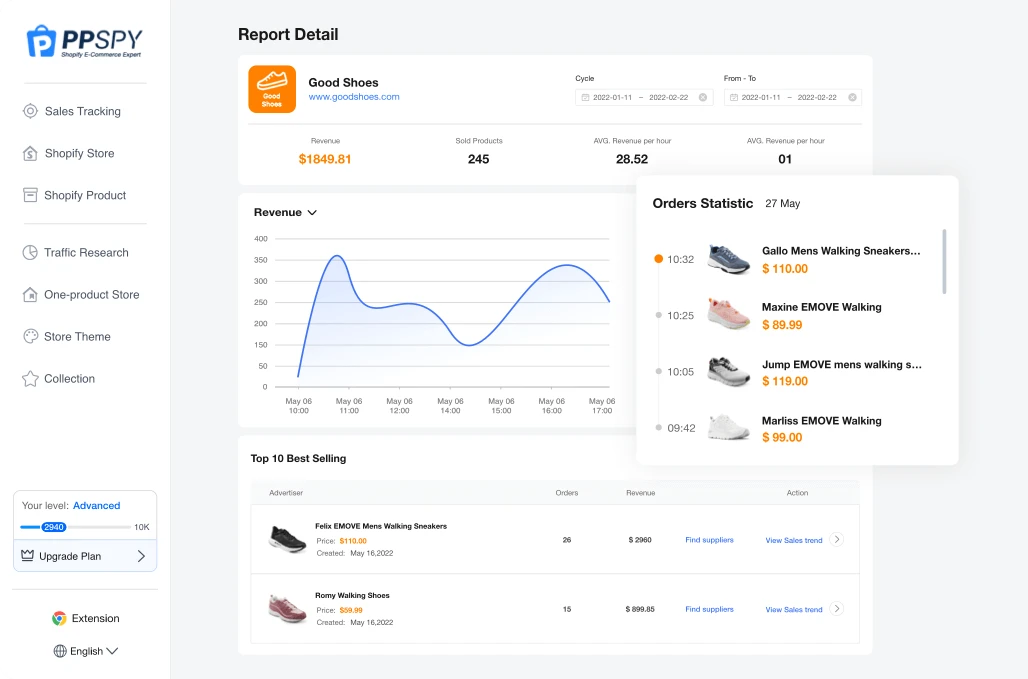
Track a store and the products behind its activity
The Sales Tracking preview combines a revenue chart, an order list and bestselling products. PPSPY advertises a fifteen-day report: look for continuity across the period rather than one high point.
If a few items dominate, open their pages and compare prices, variants and availability. A leading product does not mean the whole catalogue works. Record the period too: a recent sales estimate and a historical total answer different questions.
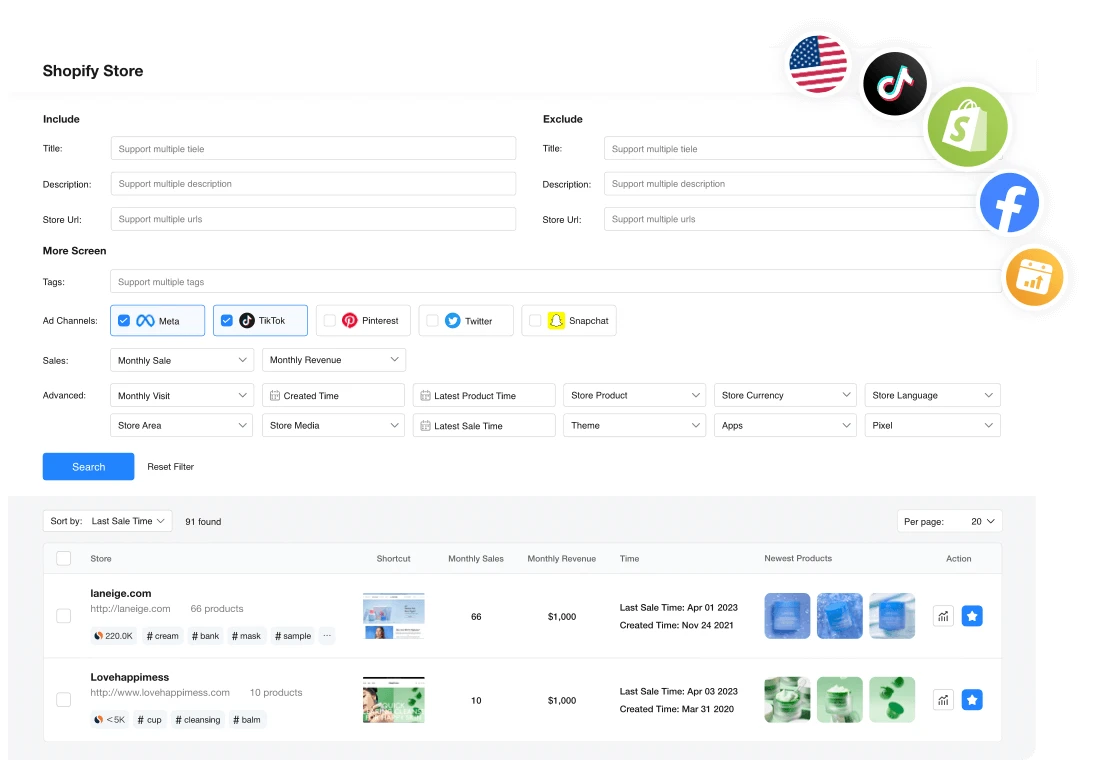
Find genuinely comparable stores
Shopify Store search offers sales, revenue, language, region, product count, theme and app filters. Start with a category and a market, then add filters that reduce differences between sellers.
Comparing a French store with a large international brand can inspire presentation, but does not make them equivalent competitors. Examine currency, delivery coverage and range. Keep three to five similar stores rather than a list too long to monitor.
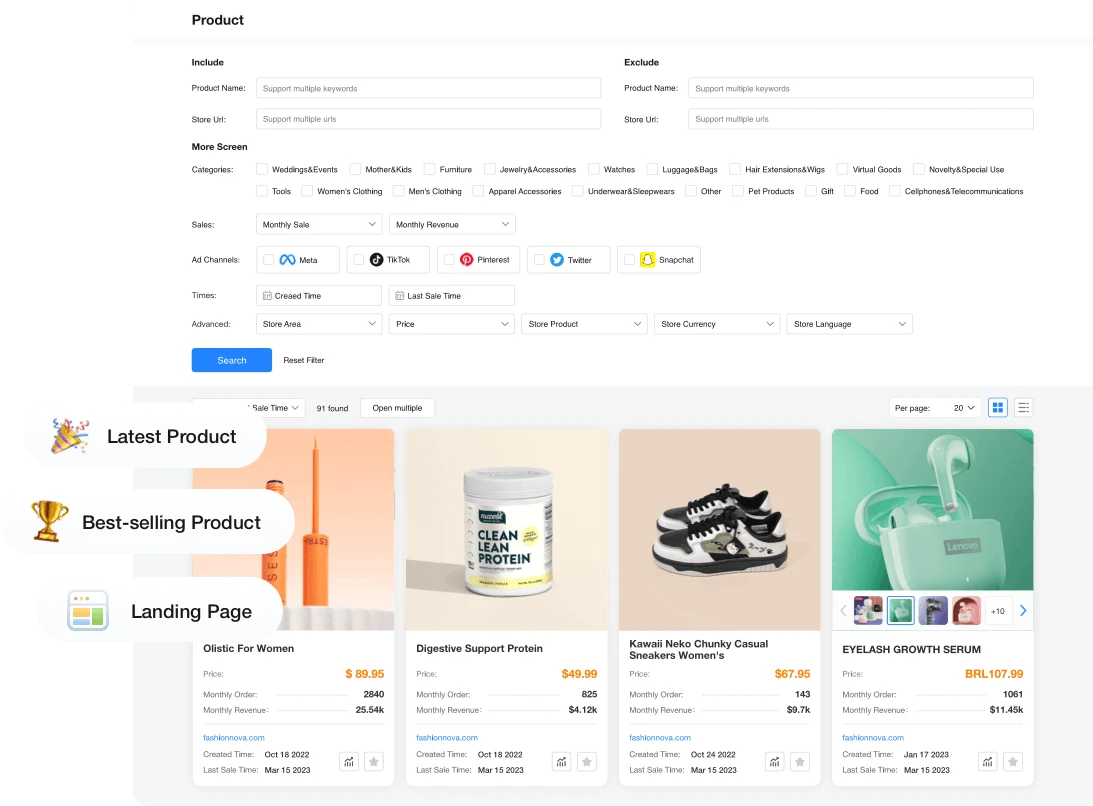
Find a product across several catalogues
Product search combines keywords, category, price and sales signals. Use it to find several offers addressing the same need, then open their pages to understand what the customer actually buys.
Similar photographs can conceal different dimensions, materials or bundles. Record package contents and variants before comparing prices. New-product and bestseller labels guide your browsing; they guarantee neither a lasting trend nor a reliable supplier.
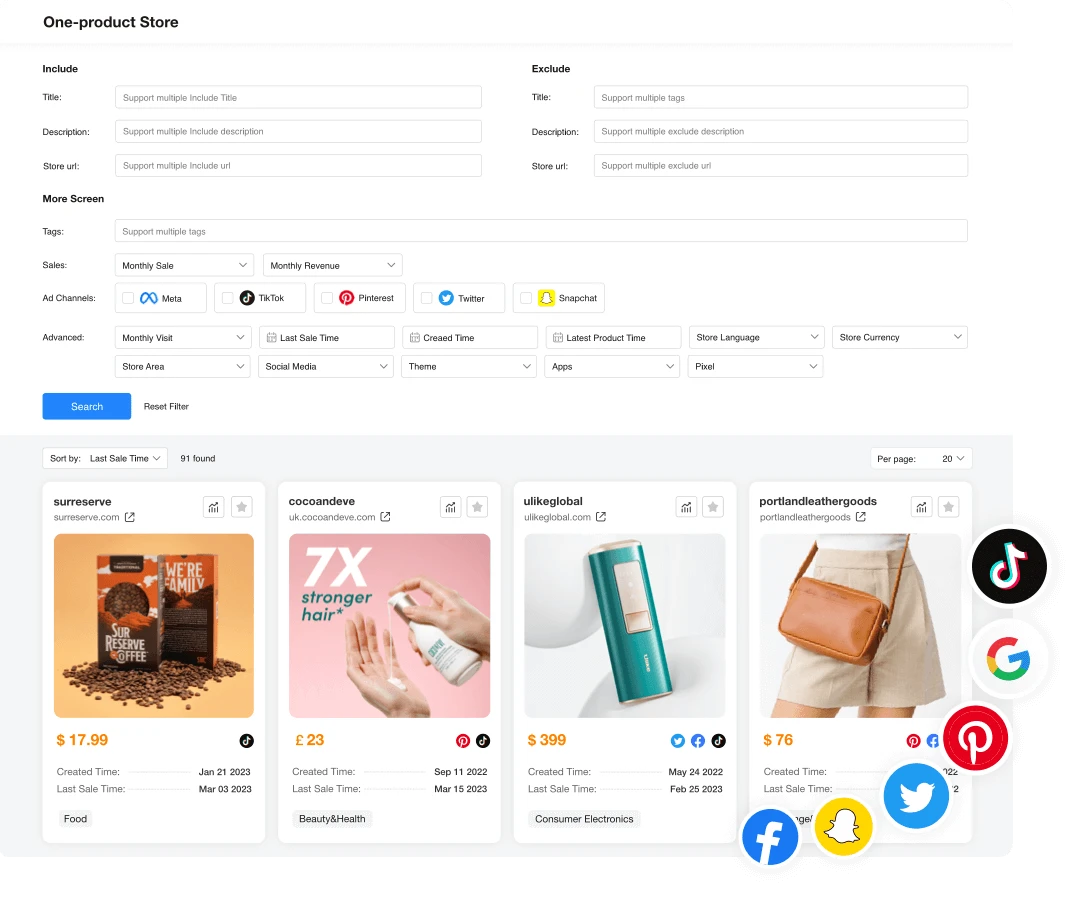
Understand a one-product store's positioning
One-product Store helps identify stores organised around an offer. The value lies in seeing how they explain the problem, demonstrate the product and address buying hesitation, not simply discovering what they sell.
A store may sell several variants or accessories around its central offer. Compare the promise, evidence, bundles and guarantees on the website itself. You need a difference to offer: reusing a competitor's photographs, text or identity does not create one.
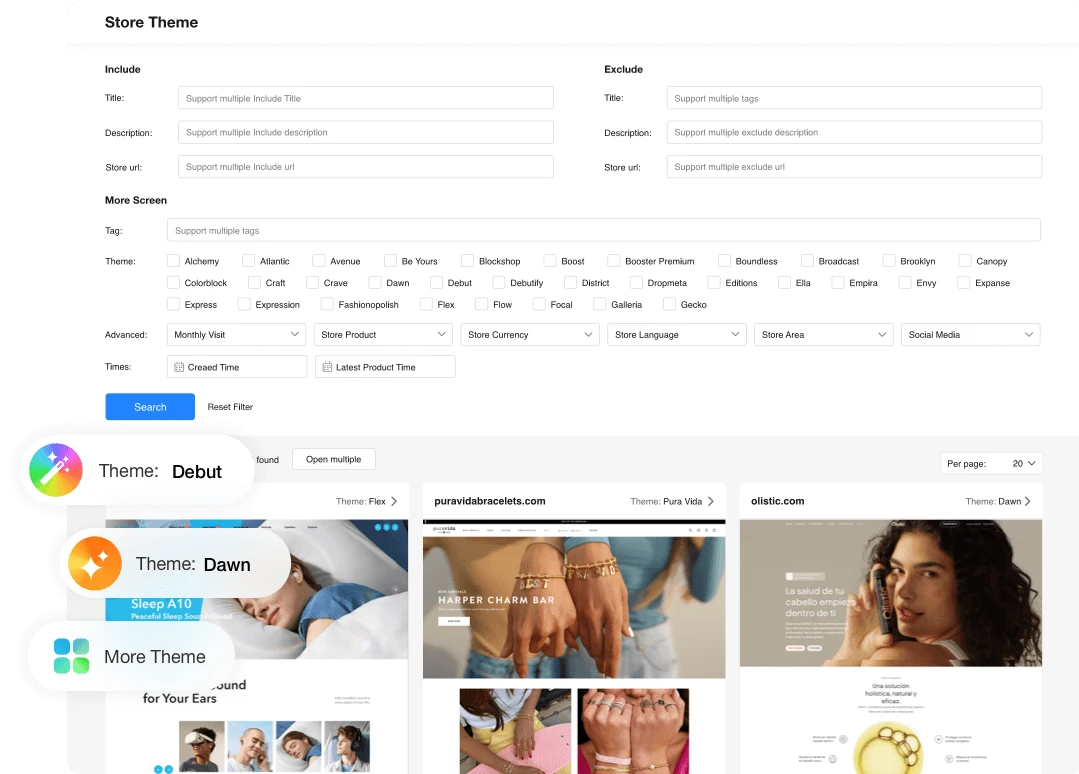
Study a theme without crediting it for sales
Store Theme lets you find examples by Shopify theme and store attributes. Study information order: variants near the price, accessible delivery costs, size details and evidence where shoppers need them.
A theme name does not reveal a store's customisation. Apps, code changes and content can alter the experience. Before buying the same theme, check that your own product page answers essential questions and works well on a phone.
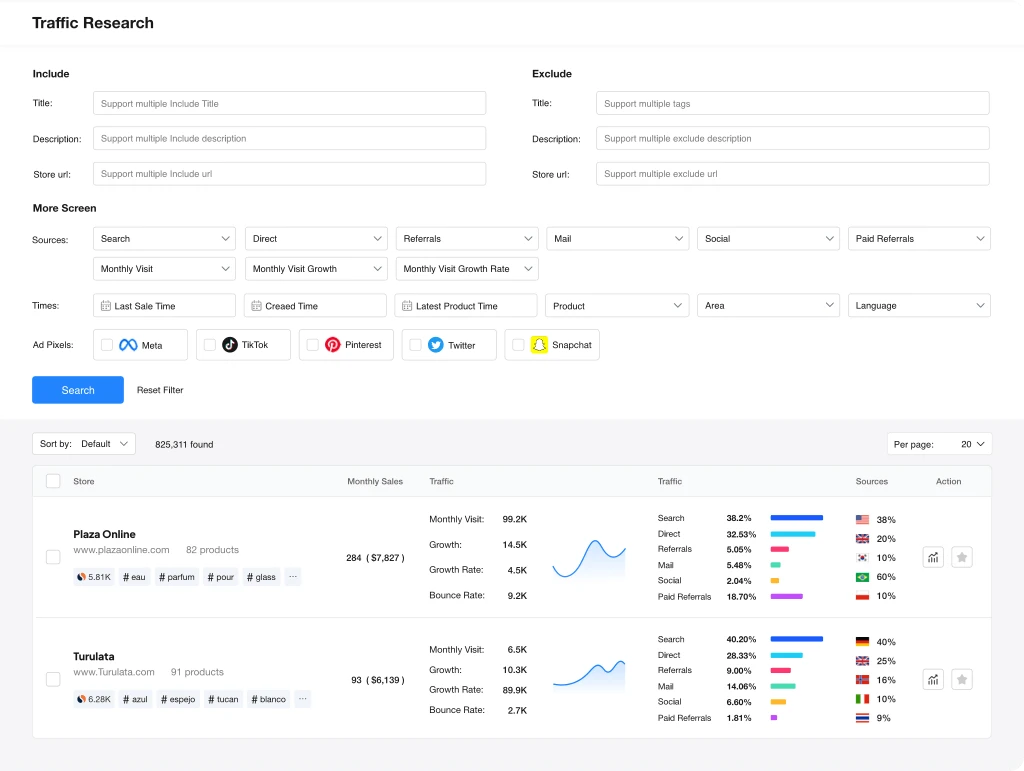
Connect the store to its traffic sources
Traffic Research presents search, direct visits, referrals, email, social media and paid sources. A store supported by its brand or email list is a different comparison from a seller dependent on recent ads.
These estimates help choose the next research step. If advertising appears important, examine ads with PiPiAds or Adsparo. If traffic seems mainly organic, study content and positioning instead. A pixel's presence alone does not prove that a campaign is active.
Worked example: compare three travel packing-cube offers
A fictional example, with no measured sales. You are considering selling travel packing cubes and find three Shopify stores. PPSPY helps locate products and track sellers; public product pages then clarify what each offer contains.
Store A€34.90: six standard packing pouches
- Why it matters
- Compare dimensions, zip quality, delivery and exact bundle contents.
Store B€54.90: eight pieces with compression
- Why it matters
- Function and contents differ. It is not simply the same offer at a higher price.
Store C€24.90: three pieces in several sizes
- Why it matters
- The entry price is lower, but piece count and the needs covered are different.
| Fictional store | Offer to compare | Why it matters |
|---|---|---|
| Store A | €34.90: six standard packing pouches | Compare dimensions, zip quality, delivery and exact bundle contents. |
| Store B | €54.90: eight pieces with compression | Function and contents differ. It is not simply the same offer at a higher price. |
| Store C | €24.90: three pieces in several sizes | The entry price is lower, but piece count and the needs covered are different. |
Price per piece would give a misleading ranking: a compression cube and a simple pouch do not serve the same purpose. Before choosing B for its higher basket value, check demand for compression and order a sample. Zips, usable volume and durability must support the promise.
If A shows steady estimated sales and B only a spike, follow both over the same period. Then prepare a precise offer: dimensions suited to the target luggage, clearly illustrated bundle contents and a demonstration you can make yourself. Tracking helps select the test, not announce its results.
How to interpret a store's signals
A spike in estimated salesA temporary increase to investigate
- Useful check
- Compare several days and look for a promotion, seasonal demand or an influx of traffic.
One item dominates the catalogueA central offer to understand
- Useful check
- Check variants, bundles, stock and price on the product page instead of generalising to the entire store.
Many visits, few estimated salesTwo indicators telling different stories
- Useful check
- Align periods and markets; do not derive an actual conversion rate from estimated data.
An item is unavailableA possible stock issue or incomplete information
- Useful check
- Check several variants and dates. Being out of stock does not establish commercial success on its own.
| Observation | What it suggests | Useful check |
|---|---|---|
| A spike in estimated sales | A temporary increase to investigate | Compare several days and look for a promotion, seasonal demand or an influx of traffic. |
| One item dominates the catalogue | A central offer to understand | Check variants, bundles, stock and price on the product page instead of generalising to the entire store. |
| Many visits, few estimated sales | Two indicators telling different stories | Align periods and markets; do not derive an actual conversion rate from estimated data. |
| An item is unavailable | A possible stock issue or incomplete information | Check several variants and dates. Being out of stock does not establish commercial success on its own. |
A six-step Shopify research method
Organise research around a specific decision: test a new offer, extend your range or monitor a competitor. A small selection followed over a consistent period is more useful than hundreds of saved stores.
- 1
Define the product and market
Write down the customer need, category, country, price range and delivery constraints. Try several common product names so your research is not limited to one seller's vocabulary.
- 2
Select a few similar stores
Compare language, delivery region, range and catalogue size. Open their public websites: a page found in a database may have changed. Record your observation date and the period used for estimates.
- 3
Describe the offer, not just the product
Record variants, bundle contents, dimensions, delivered price, guarantee and accessories. An eight-piece set and a single item require different comparisons. Identify missing evidence in your own offer: a demonstration, measurements or an explanation of use.
- 4
Track the same items
Observe developments over a common period. Separate new products, apparent bestsellers and promotions. A trend becomes more credible when it fits product pages and ads, although the numbers remain estimates.
- 5
Check the channel and test economics
Examine ads if they seem to support the store. Calculate your contribution before acquisition: price excluding tax minus product, shipping, payment fees and a returns allowance. Compare it with your own test costs, never a competitor's estimated revenue.
- 6
Test, monitor or reject
Test when the offer is clear, the sample acceptable and the margin compatible with your budget. Monitor if the signal is too recent. Reject a lead whose supplier, delivery or product constraints do not fit your customers.
PPSPY, ShopHunter, Winning Hunter or PiPiAds?
Choose a tool based on your question. PPSPY is particularly useful when you start with a Shopify store or its catalogue. It does not replace deeper research into an advertising channel or TikTok Shop.
Explore a Shopify storePPSPY or ShopHunter
- Why
- Compare products and sales signals. PPSPY also offers research by theme and store attributes.
Connect ads, products and storesWinning Hunter
- Why
- Combine several sources when an ad is the starting point of your research.
Study TikTok adsPiPiAds
- Why
- Examine creatives, advertisers and advertising angles instead of only the Shopify catalogue.
Analyse TikTok ShopKalodata
- Why
- Study TikTok Shop products, creators and stores; this market is distinct from Shopify.
| Your need | Tool to consider | Why |
|---|---|---|
| Explore a Shopify store | PPSPY or ShopHunter | Compare products and sales signals. PPSPY also offers research by theme and store attributes. |
| Connect ads, products and stores | Winning Hunter | Combine several sources when an ad is the starting point of your research. |
| Study TikTok ads | PiPiAds | Examine creatives, advertisers and advertising angles instead of only the Shopify catalogue. |
| Analyse TikTok Shop | Kalodata | Study TikTok Shop products, creators and stores; this market is distinct from Shopify. |
Explore Shopify store tracking and compare products contributing to estimated activity.
Connect a product lead with its sellers and the ads making it visible.
Compare a product's TikTok ads and prepare a different demonstration.
Check ads and sales angles when advertising appears to support the store.
Our view: useful for understanding an offer, not predicting your profit
A good choice when you start with Shopify
PPSPY brings together complementary store, product, theme and traffic searches. It helps compare a range and understand why two sellers are not really offering the same thing. That is more useful than collecting product photos without examining delivered prices, variants or availability.
Less suitable when your question lies elsewhere
To choose a TikTok creative or analyse TikTok Shop creators, start with the relevant channel tool. PPSPY can then clarify an associated Shopify store. If you already have a product and supplier, a sample, cost analysis and feedback from real customers may add more than another search.
Limits to account for in your decision
- Sales, revenue and traffic figures are estimated signals. They reveal neither ad costs, returns nor net margin; an attractive chart does not prove profit.
- Periods must be comparable. A promotion or seasonal spike can alter the picture, especially over a short observation. Keep dates and references instead of an isolated number.
- Shopify stores do not represent every seller in the market. Other platforms, channels and offers may address the same need without appearing in your selection.
- Theme, app and traffic information does not replace visiting the store. Check what is still online, then produce your own content and evidence.
Frequently asked questions about PPSPY
How much does PPSPY cost?
Direct plans list Standard at USD 39/month, Pro at USD 99/month and Business at USD 299/month. Annual prices are USD 328, 832 and 2,512 respectively. These amounts were checked on 3 October 2026; verify final terms with PPSPY.
Is PPSPY free?
PPSPY announces a no-card trial after email registration. Its pricing page does not specify the duration or allowances. This does not mean every feature or a paid subscription is free without limits.
Is PPSPY included in Spybox?
PPSPY is among the product research tools presented in Spybox. The Spybox offer lists 90+ tools and 100,000 monthly SBC credits. Check available access and consumption in Spybox; an individual PPSPY Pro account is not guaranteed.
Is there a PPSPY promo code?
The pricing page checked does not list a PPSPY promo code. Annual billing advertises a subscription discount. GET25 applies only to Spybox; check its discount in the Spybox order summary.
Are PPSPY sales estimates reliable?
PPSPY explains that it uses an algorithm to predict orders. Estimates can help track developments or prioritise a store, but are not audited accounts. Cross-check product pages, the observation period and ads.
Can PPSPY find a Shopify theme?
Store Theme presents research by theme and store attributes. It helps find presentation examples. It does not automatically reveal the site's complete configuration, customisation or reasons for conversion.
PPSPY or ShopHunter: which should I choose?
Both can help analyse Shopify stores. Consider your main need: store tracking, product research, themes or filters. Compare allowances and features of your chosen access rather than deciding only on an entry price.
Does PPSPY replace PiPiAds or Kalodata?
No. PiPiAds supports TikTok advertising research, while Kalodata analyses TikTok Shop. PPSPY explores Shopify stores, their products and signals. They can complement one another when a product appears across several channels.
Are PPSPY credits the same as SBC?
No. Credits in direct PPSPY subscriptions and Spybox SBC credits belong to different offers. An allowance of 100,000 in both cases does not imply identical research capacity or features.
Connect the store, advertising and test preparation
With Spybox, use PPSPY to compare Shopify stores, then advertising and creative tools suited to your product. Review pricing and credits before choosing a subscription.