
SEO workflow with Spybox
Your site has pages appearing in Google, but which should you improve? This guide uses a fictional water bottle store to organise diagnosis, writing and measurement, one page at a time.
Spybox provides research and creative tools. Rankerfox offers access to separate products: changes still happen on your website, and results need reading in your own data.
Who does what: Spybox, Rankerfox and your accounts
Rankerfox brings together digital marketing tools and resources. It is not one application crawling your site, researching queries and tracking rankings. Choose the product answering your task, then check availability and features in the access offered. A name in the catalogue does not mean every publisher option is included.
Search Console is a separate, free Google service for monitoring your own site after verifying ownership or receiving the required permissions. You do not need Spybox to use it. Similarly, your CMS or developer applies changes; an analysis does not automatically update your pages.
| Need | Where to work | What you should obtain |
|---|---|---|
| Understand searches showing the site | Your Google Search Console. | A dated list of pages and queries, with clicks, impressions and filters. |
| Check a page and indexing | URL Inspection and a browser; a crawler if volume warrants one. | A specific issue, distinguishing the live page from the version Google knows. |
| Extend topic research | Observed Google results; a specialist product available through Rankerfox or a direct subscription. | A few reader needs, corresponding pages and sources. |
| Prepare or review copy | ChatGPT or Claude, working from your verified information. | A proposed outline or text to check, not proof of ranking. |
| Publish a correction | Your CMS, store or developer. | A usable page with the right information and links. |
| Monitor results | Search Console and your enquiry or order records. | A comparison using consistent filters; optionally a separate rank tracker. |
Understand searches showing the site
- Where to work
- Your Google Search Console.
- What you should obtain
- A dated list of pages and queries, with clicks, impressions and filters.
Check a page and indexing
- Where to work
- URL Inspection and a browser; a crawler if volume warrants one.
- What you should obtain
- A specific issue, distinguishing the live page from the version Google knows.
Extend topic research
- Where to work
- Observed Google results; a specialist product available through Rankerfox or a direct subscription.
- What you should obtain
- A few reader needs, corresponding pages and sources.
Prepare or review copy
- Where to work
- ChatGPT or Claude, working from your verified information.
- What you should obtain
- A proposed outline or text to check, not proof of ranking.
Publish a correction
- Where to work
- Your CMS, store or developer.
- What you should obtain
- A usable page with the right information and links.
Monitor results
- Where to work
- Search Console and your enquiry or order records.
- What you should obtain
- A comparison using consistent filters; optionally a separate rank tracker.
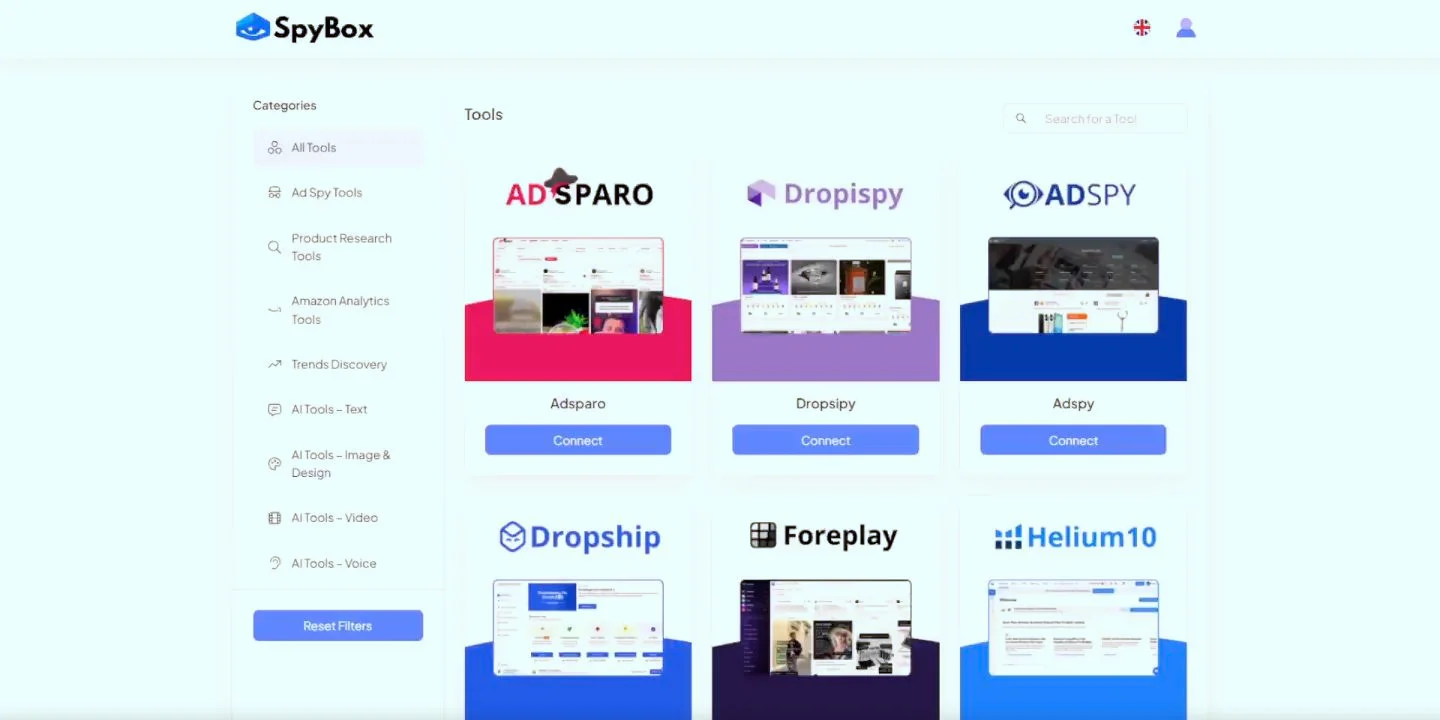
A catalogue is not an audit of your site
This public demonstration shows grouped tools, not your account or an SEO report. It illustrates the access point; the selected software, its functions and Search Console measurement remain separate. The preview may predate the current application appearance.
Illustration sourceStart with a few pages and a dated reference
For an existing site, open Search Console's Performance report. Choose Web search and a complete period, such as 28 days, instead of comparing a partial day with a finished month. Start with pages, then filter an individual URL to examine its queries. Country and device filters help explain where a change originates.
Select three to five pages relevant to the business: a category, product and guide may suffice. Record each URL, period, filters, clicks, impressions and the question it answers. Also keep its title and a copy of the content before changing it. A spreadsheet is enough to begin; no additional subscription is necessary at this stage.
Separate searches mentioning your brand from those describing a need. Greater brand awareness can increase home page clicks without improving category visibility. Check the actual destination too: a purchase query opening a general article calls for a different reading from a cleaning question reaching the right guide.
- Record the exact URL and filters so you can repeat the same analysis.
- Keep orders and enquiries in your business records; Search Console does not measure revenue.
- For a new or lightly visited site, extend the period before judging a page on two clicks.
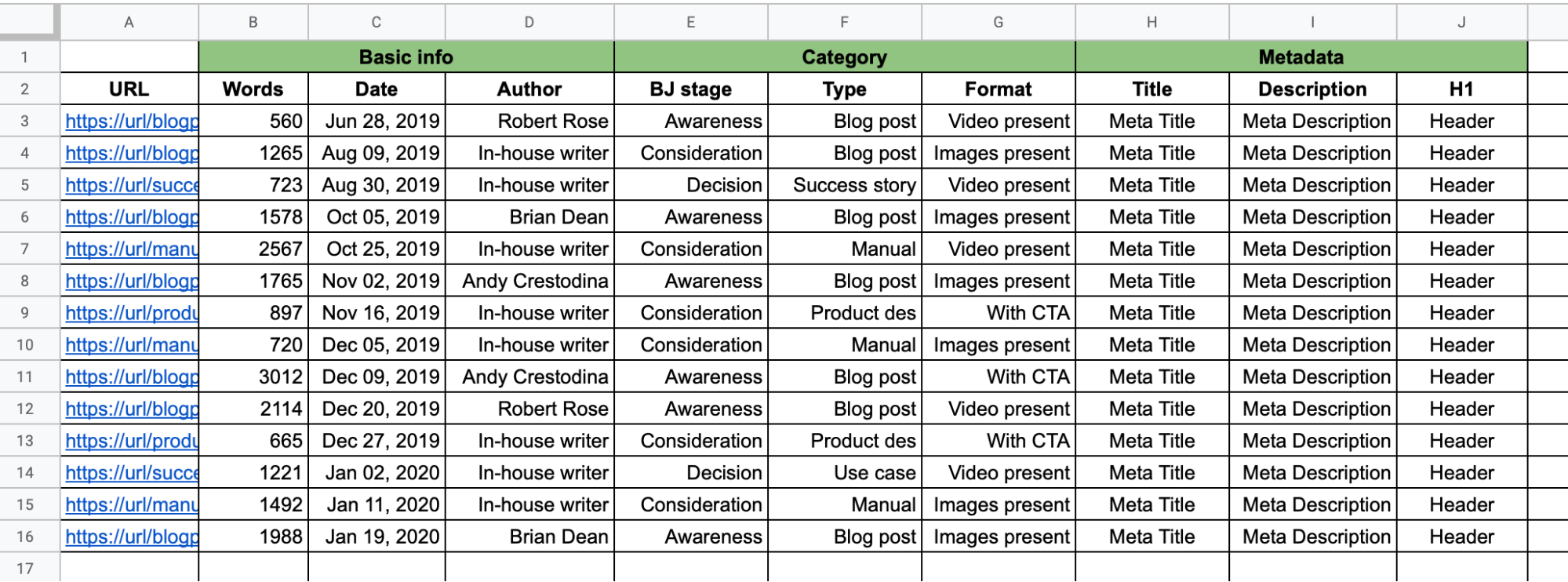
An inventory to keep track of pages
Semrush's example shows an inventory spreadsheet, not a Spybox audit result. For a few pages, adapt the principle: URL, question, starting data and change. You need not complete every column or target the examples' word counts.
Illustration sourceCheck blockers before rewriting
Open the selected page on desktop and a small screen. Are the product, price, images and links usable? If an error prevents viewing the page, writing is not the first action. Then inspect the URL in Search Console: the indexed status describes what Google already knows; the live test examines the current page.
Targeted checks may suffice for a few pages. A larger site gives more reason to use a crawler and group problems by page type: categories, product variants or pagination. Choose that software and its limits separately from Rankerfox. Ask the person responsible for the site to handle settings you do not understand.
| What you observe | What to check | Possible first action |
|---|---|---|
| Page will not open | Final address, server error or broken redirect. | Restore the page or correct link before adding content. |
| Wanted page, not indexed | Inspection reason: block, noindex, duplicate or another status. | Address the actual cause; do not remove site rules at random. |
| Google selects another URL | Selected version, both pages' content and links leading there. | Check whether it is a legitimate variant or an inconsistency. |
| Unusable mobile images or text | Loading, dimensions, overflow and text size. | Correct the rendering and test the journey again. |
| Indexed page, few clicks | Queries, position, country, device and what the result promises. | Read the page and results before blaming the title alone. |
Page will not open
- What to check
- Final address, server error or broken redirect.
- Possible first action
- Restore the page or correct link before adding content.
Wanted page, not indexed
- What to check
- Inspection reason: block, noindex, duplicate or another status.
- Possible first action
- Address the actual cause; do not remove site rules at random.
Google selects another URL
- What to check
- Selected version, both pages' content and links leading there.
- Possible first action
- Check whether it is a legitimate variant or an inconsistency.
Unusable mobile images or text
- What to check
- Loading, dimensions, overflow and text size.
- Possible first action
- Correct the rendering and test the journey again.
Indexed page, few clicks
- What to check
- Queries, position, country, device and what the result promises.
- Possible first action
- Read the page and results before blaming the title alone.
HTTP 200, a sitemap and a successful live test do not guarantee indexing or ranking. Equally, not every excluded URL needs fixing: a private page or intentionally excluded variant may have an appropriate status. Start with pages you actually want accessible.
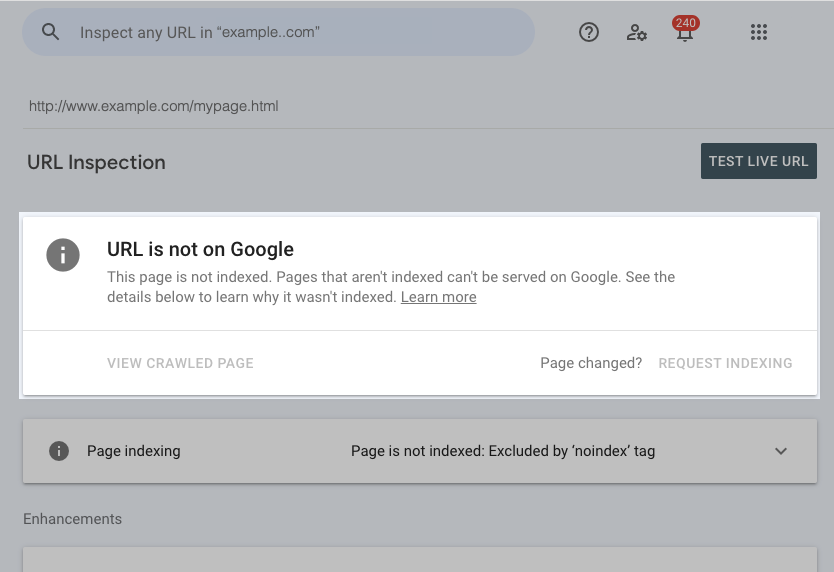
Not indexed: read the reason first
In this Google Help example, the demonstration URL is not indexed and a noindex reason appears. It is neither a Spybox page nor your Search Console property. For your URL, open the details and distinguish Google's known status from a test of the current version.
Illustration sourceMatch each search to the right page
Choose a query observed in your data, then examine a few Google results in the target market. Record the kind of answer: a shopping category, specific product, comparison or explanation. Open useful pages and note what readers can find: dimensions, delivery, testing, a table or demonstration. The purpose is to understand the question, not reproduce competitors' copy.
Additional research in SEO software can reveal related wording and estimated demand. These help guide selection, but do not describe your sales or ability to outrank existing sites. An unclear category may deserve improvement before creating ten articles around the same product.
| Example search | Expected answer | Destination in our fictional store |
|---|---|---|
| 750 ml stainless steel water bottle | Compare available models, capacity and purchase terms. | Stainless steel bottle category with filters and links to models. |
| 750 ml water bottle sports cap | See whether a specific model has the cap wanted. | That model's product page, cap photographs and package contents. |
| how to clean a stainless steel water bottle | A cleaning method compatible with the product. | Guide based on manufacturer instructions, linking to relevant models. |
750 ml stainless steel water bottle
- Expected answer
- Compare available models, capacity and purchase terms.
- Destination in our fictional store
- Stainless steel bottle category with filters and links to models.
750 ml water bottle sports cap
- Expected answer
- See whether a specific model has the cap wanted.
- Destination in our fictional store
- That model's product page, cap photographs and package contents.
how to clean a stainless steel water bottle
- Expected answer
- A cleaning method compatible with the product.
- Destination in our fictional store
- Guide based on manufacturer instructions, linking to relevant models.
These searches illustrate different needs. If similar pages share the same queries, compare their purpose and destination before creating another. Do not merge a category and a guide simply because both mention bottles. Before any removal or redirect, check existing links, traffic and the page's use.
Example: improve a stainless steel bottle category
This exercise is entirely fictional, not results from a store monitored by Spybox. Over 28 complete days, with Web search and France selected, the category receives 3,000 impressions and 60 clicks. Its CTR is 60 ÷ 3,000 × 100 = 2%. Average position is 9.2. These figures support an investigation, not a conclusion that the title must be poor.
In this example, visible queries mainly mention 500 and 750 ml capacities. Yet the page only has a general paragraph, unclear product names and no cap comparison. The hypothesis is straightforward: visitors struggle to find the information needed to choose. Improve this category without simultaneously starting new guides.
| Page element | Planned change | Check before publication |
|---|---|---|
| Title and page opening | Propose '500 and 750 ml stainless steel bottles: models and caps'. | Both capacities exist in the catalogue; no 'insulated' claim without a matching model. |
| Choosing a model | Compare capacity, dimensions, cap type and included accessories. | Every value comes from the manufacturer sheet or a documented measurement. |
| Photographs | Show the open cap and a familiar object for scale. | Your models or authorised media, without invented properties. |
| Next step | Link each model to its product page and add the existing cleaning guide. | Correct destination, stock, price, fees and instructions consistent with the store. |
Title and page opening
- Planned change
- Propose '500 and 750 ml stainless steel bottles: models and caps'.
- Check before publication
- Both capacities exist in the catalogue; no 'insulated' claim without a matching model.
Choosing a model
- Planned change
- Compare capacity, dimensions, cap type and included accessories.
- Check before publication
- Every value comes from the manufacturer sheet or a documented measurement.
Photographs
- Planned change
- Show the open cap and a familiar object for scale.
- Check before publication
- Your models or authorised media, without invented properties.
Next step
- Planned change
- Link each model to its product page and add the existing cleaning guide.
- Check before publication
- Correct destination, stock, price, fees and instructions consistent with the store.
The search description can explain capacity and cap choices, followed by terms actually offered. It should not promise unavailable delivery or discounts. The title remains a proposal: Google may display another wording based on the page and links describing it.
Keep the old version and publication date. The first verifiable goal is a clearer, working category. Any increase in clicks or orders needs measuring later. There is no observed traffic growth, promised position or 'ideal' CTR applying to every search here.
Use AI to work with information, not invent it
Prepare material before opening ChatGPT or Claude: manufacturer sheets, capacities, dimensions, authorised photographs, package contents and sales terms. Add customer questions you have actually received, removing personal information first. Competitor observations may suggest a question to answer; they cannot prove a property of your model.
For the bottle category, first ask for an outline centred on capacity and cap choice. Check it against the catalogue, then work through passages individually. A table of verified specifications is more useful than a long general discussion of hydration. Leave a missing value to check instead of asking the model to fill it in.
- Connect every capacity, dimension and property to a source or measurement.
- Remove unsupported superlatives, invented testimonials and sentences that help no decision.
- Review the text against actual products, not only through another assistant.
- Keep approved copy in your own files; do not upload confidential documents through unapproved access.
Length depends on the question. A category can stay concise while providing a useful comparison; a cleaning guide may need steps and photographs. Adding paragraphs to reach a word count cannot replace useful information. For a translation, also check units, models, prices and links.
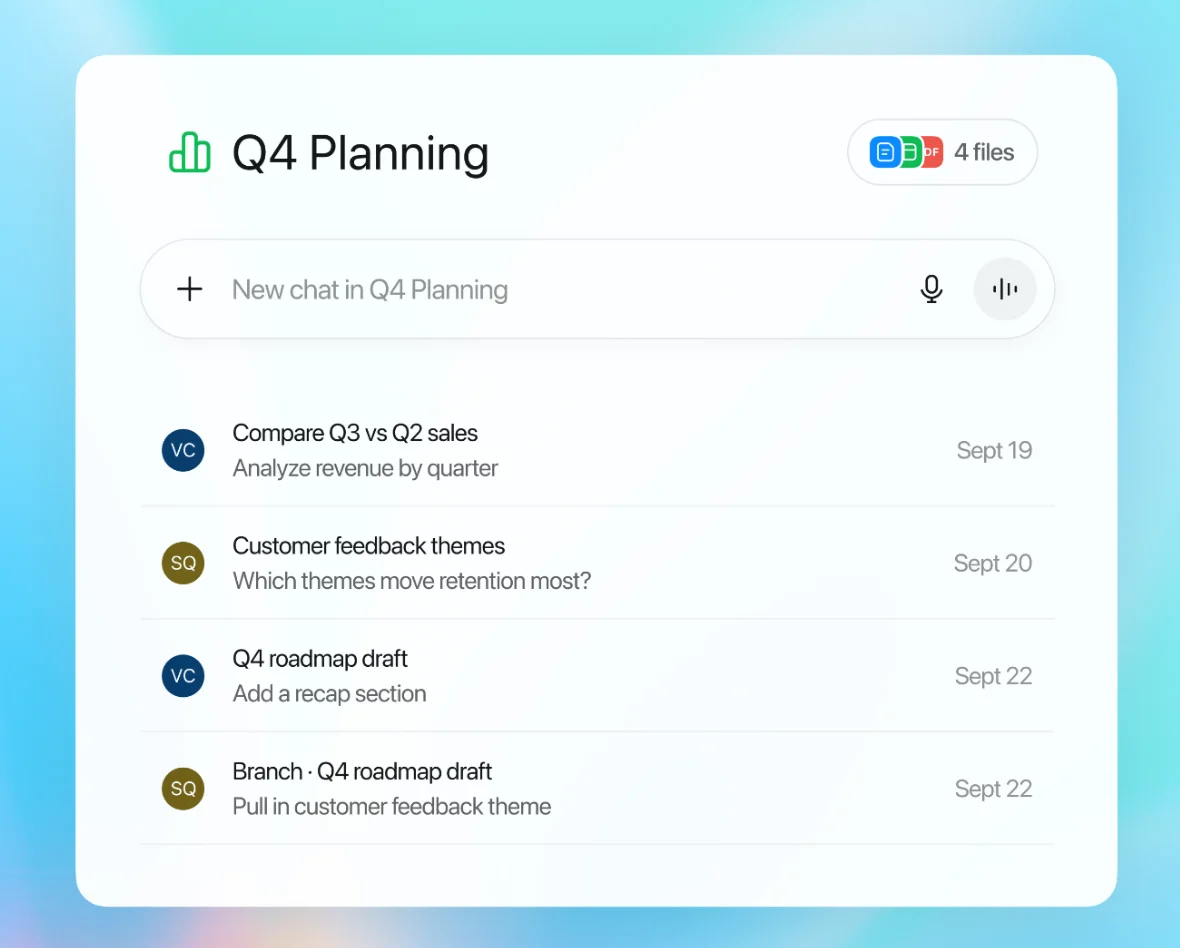
Keep context without confusing the tool with validation
OpenAI illustrates grouping files and conversations in a project. For writing, the useful idea is to work with consistent approved information. This is not a client workspace; it does not establish that projects, sharing or every direct feature are available through Spybox.
Illustration sourcePublish, then check the accessible page
Apply changes on the site and open the public URL, not just the editor preview. Compare the title, product facts, images and destinations. On a phone or narrow screen, the table must remain readable and buttons reachable. Try the category-to-product journey, then go back.
After an important change, URL Inspection helps check the current version and last known crawl. An indexing request can be appropriate for a corrected URL; it cannot force ranking, and repeating it does not speed up processing. A sitemap supports discovery, using dates reflecting real changes.
- The intended URL opens without an error or outdated destination.
- The main heading and description match the content actually published.
- Images, product links and cleaning guide work on large and small screens.
- Indexing settings and the declared canonical version fit the project.
- Sales terms agree with the rest of the store.
- The previous version, date and changes are recorded for review.
Connect useful pages before seeking more links
In the fictional store, the category should lead to the right product pages. The cleaning guide can link to models its instructions apply to, and a product page can offer that guide to someone unsure about cleaning. A link helps continue a question; you need not connect every page to every other one or repeat the same label everywhere.
External links are a separate task. If you examine a competitor's links in available software, check the publishing site, context and relevance to your business. An authority score is not enough to select a partner. A specialist publication, useful resource or existing relationship may be more relevant than a list of addresses contacted without a reason.
Start with material you can actually offer: a measurement, original photographs, a detailed answer to a problem or a relevant partnership. Tool access does not include obtaining links or rights to other sites' media. For advanced link analysis, check the specific software and plan separately.
Compare complete periods after the new crawl
Let Google discover the change, then record the new crawl date when it becomes visible. For this single-page task, plan an initial reading of 14 complete days, followed by 28 days if volume allows. This is the review cadence proposed here, not a timeline guaranteed by Google. Fix an outage, wrong URL or inaccurate information immediately.
Use the same filters: URL, Web search, country and device. Also compare visible queries and other store pages. A new campaign, seasonality or more brand searches may explain overall growth. Average position aggregates different searches; it does not represent a fixed rank for your main term.
| Review observation | What to read | Possible decision |
|---|---|---|
| More impressions, lower CTR | Does the page appear for new queries or at different positions? | Read clicks and query groups before rewriting the title. |
| Same visibility, fewer clicks | Have the displayed result, competitors, country or device changed? | Check the answer and presentation; a short comparison does not prove causation. |
| More clicks, few orders | Stock, terms, destination relevance and sales measurement. | Examine the commercial journey before producing more articles. |
| URL still not indexed | Latest inspection reason and access to the page. | Address a confirmed blocker; avoid repeated requests without changes. |
| Only a few clicks | Insufficient volume, normal variation and too short a period. | Keep the page if accurate and useful; extend observation. |
More impressions, lower CTR
- What to read
- Does the page appear for new queries or at different positions?
- Possible decision
- Read clicks and query groups before rewriting the title.
Same visibility, fewer clicks
- What to read
- Have the displayed result, competitors, country or device changed?
- Possible decision
- Check the answer and presentation; a short comparison does not prove causation.
More clicks, few orders
- What to read
- Stock, terms, destination relevance and sales measurement.
- Possible decision
- Examine the commercial journey before producing more articles.
URL still not indexed
- What to read
- Latest inspection reason and access to the page.
- Possible decision
- Address a confirmed blocker; avoid repeated requests without changes.
Only a few clicks
- What to read
- Insufficient volume, normal variation and too short a period.
- Possible decision
- Keep the page if accurate and useful; extend observation.
To understand CTR, take a separate calculation, also fictional: 90 clicks from 6,000 impressions give 1.5%. This is below the initial 2% CTR, but more clicks than 60. A falling ratio is therefore not automatically falling traffic. Read the queries and positions making up that total.
End the review with a short decision: keep the page, fix a specific defect or investigate a question. Do not automatically attribute a movement to the last rewrite. Record uncertainty where evidence cannot settle it; another immediate change would make the next comparison harder.
When Spybox access merits comparison
Search Console, your public pages and a spreadsheet already let you start this routine. Compare Spybox when you regularly perform several research, writing and creative tasks. For one specialist product, permanent projects, a team or integration, also compare the direct subscription covering that exact requirement.
The offer presented on this site brings together 90+ tools. Reference prices dated August 4, 2026 remain €29.99/month or €249.99/year. The code GET25 applies to Spybox, not a Semrush, Ahrefs or ChatGPT promotion. Read the final total and terms before payment.
The documented standard allocation is 100,000 SBC per month. Costs vary by action; documentation states a monthly discount may proportionally reduce that allocation, while annual subscriptions are exempt. Check the credits and exports needed. Spybox describes individual access: this is not a team licence or permission to share credentials.
Questions about this SEO method
Is Rankerfox one application doing all SEO work?
No. Rankerfox groups tools and resources. Identify the software needed for research, auditing or tracking, then check its features and limits in the access offered. Changes happen on your site and results are read in your data.
Do I need to pay Spybox to use Search Console?
No. Search Console is a separate, free Google service. You need the appropriate permissions on the site's property. It lets you start measurement without buying another subscription.
Which page should I improve first?
Choose a page relevant to the business, then examine its searches, data and content. Fix an actual blocker first. An already visible but unclear page may deserve improvement before creating new articles.
Is there a good CTR to target for every page?
No. It depends on queries, positions, countries, devices and displayed results. Compare consistent data and clicks obtained. The bottle example's 2% is fictional, not a universal target.
Can I publish ChatGPT or Claude copy directly?
Review it against sources and actual products. Check dimensions, properties, sales terms, links and image rights. Convincing wording does not prove a specification or guarantee ranking.
When should I compare results after a change?
First check publication and the new crawl. An initial reading of 14 complete days, followed by 28, may fit if volume allows. This is not a guaranteed timeline. Fix outages and inaccurate information immediately.
Is an indexing request enough to rank well?
No. It requests crawling, not a position. A successful live test does not guarantee indexing, and repeated requests for the same URL do not speed up crawling. Check the cause of any blocker.
Does this routine suit an agency?
One person can organise an assignment with the necessary site permissions. Separately check the environment for client files, exports and project features. Individual Spybox access is not a shared licence for the whole team.
Sources and illustrations
Public sources consulted October 4, 2026. This guide's numerical examples are fictional. Illustrations come from public demonstrations or help pages, not personal account captures, and may predate current interfaces. The site's separate pricing reference remains August 4, 2026.